In-Game GUIs
Pause / station GUIs. Illustrated source is volume 15. Master figures are OV12–OV28, plus OV33 Apex Inspect and OV34 Rewrite (added after OV19 locked as Rare Refit). Hotkey I is the character screen. The play HUD stays the visor — I is not a second HUD.
Walk it in UX · Character I. Written lock stays this chapter.
GUI figure order
Section titled “GUI figure order”Read stills in screen order, not file-number order. OV23 (Artifacts) and OV24 (Inspect flow) keep those IDs — they were added after OV18–OV22 were already numbered. OV33 is Apex Inspect; OV19 stays Rare / Augmented Refit; OV34 is Rewrite. Sequence:
- Window close lock → OV12 Character I map → OV13 doll + LOAD OUT → OV14 Customizable dock.
- Inventory bag: OV15 tabs → OV16 Gear (docked, Forge chip) → OV26 Inventory maximized (Socketables / Artifacts full bag, doll stays) → OV18 Gear maximize (Forge fills except doll; Gear bag hides) → OV17 Socketables → OV23 Artifacts → OV19 Inspect Rare Refit (five parts) → OV34 Rewrite → OV33 Apex Inspect (Invoke, Artifact, Rewrite Reroll only, no Refit) → lock plates Apex Invoke / origin / paths / Inspect gate → OV24 Inspect flow.
- Combat / Tentacles / Ordnance: maximize/minimize lock → OV20 Combat docked → OV25 Combat full screen → OV21 Tentacles docked → OV27 Tentacles full screen → OV22 Ordnance docked → OV28 Ordnance full screen.
In-game GUIs — Character screen I
Section titled “In-game GUIs — Character screen I”- Play HUD stays the visor. I is not a second HUD.
- No Map / Quests / social tabs on I. Reports, Trust, and Match Results live on Social / Command Deck / Esc — not this screen.
- The paper doll is a 3D figure. Drag to rotate on Inventory, Combat, Ordnance, and Channels. Tentacles locks a back view.
- X on the title bar closes that window. I or Esc closes the active window.
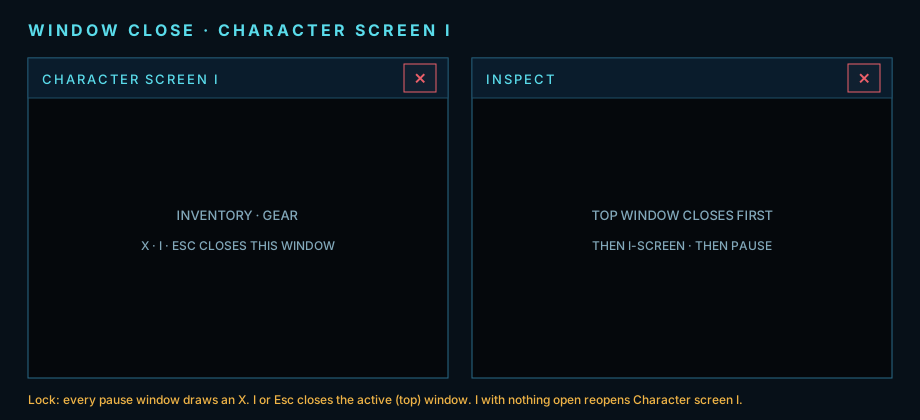
Lock plate. Every I-screen window has an X at the upper right. I or Esc closes the active window.
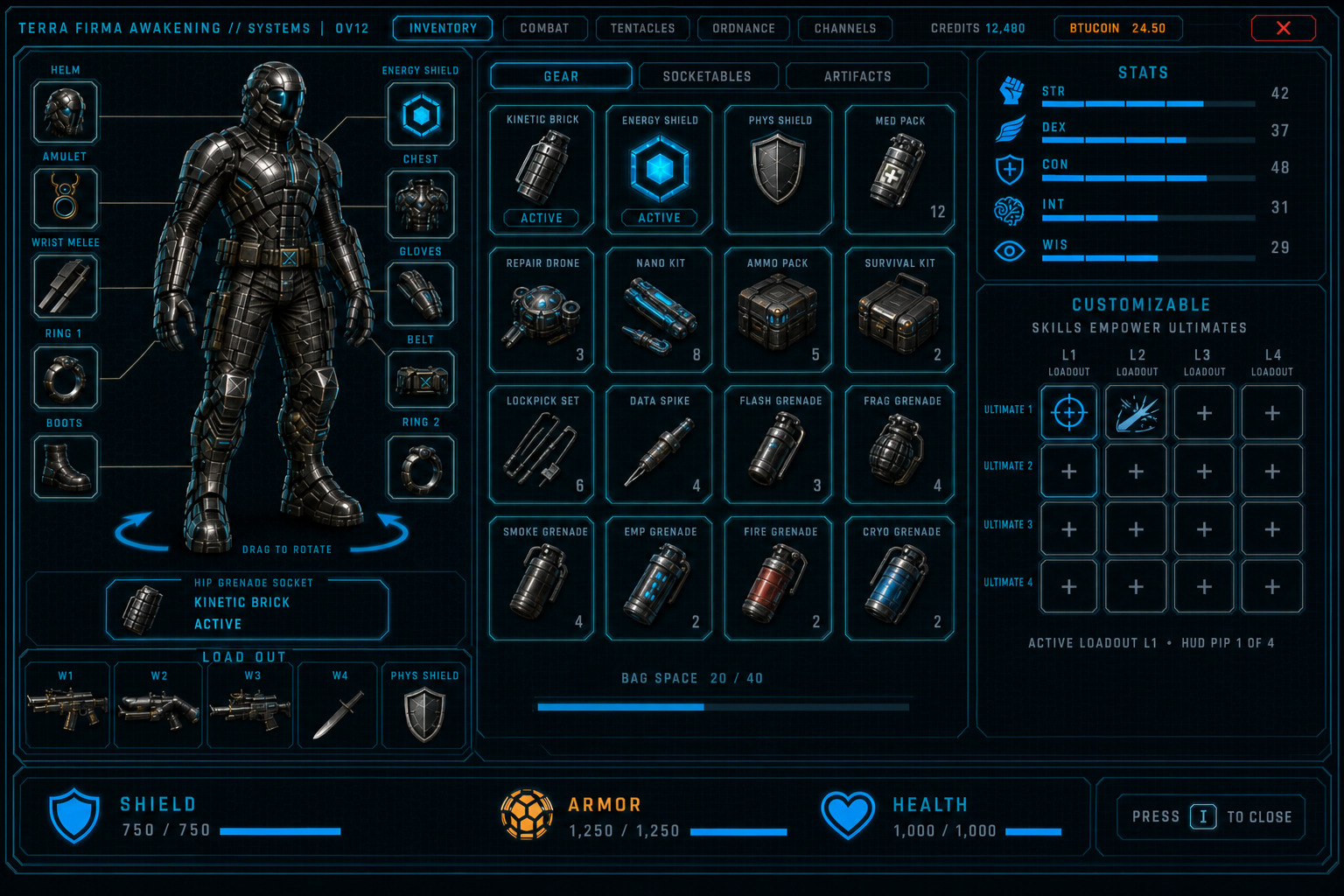
Figure OV12. Character screen I — five top tabs Inventory · Combat · Tentacles · Ordnance · Channels. Inventory bag = Gear / Socketables / Artifacts. Crafting is Inventory → Gear maximize (Forge fills except doll and LOAD OUT), not a sixth top tab. Tabs swap the center only. Doll, LOAD OUT, attribute stats, dock stay. CREDITS · BTUCOIN · X on the title bar.
Paper doll + LOAD OUT
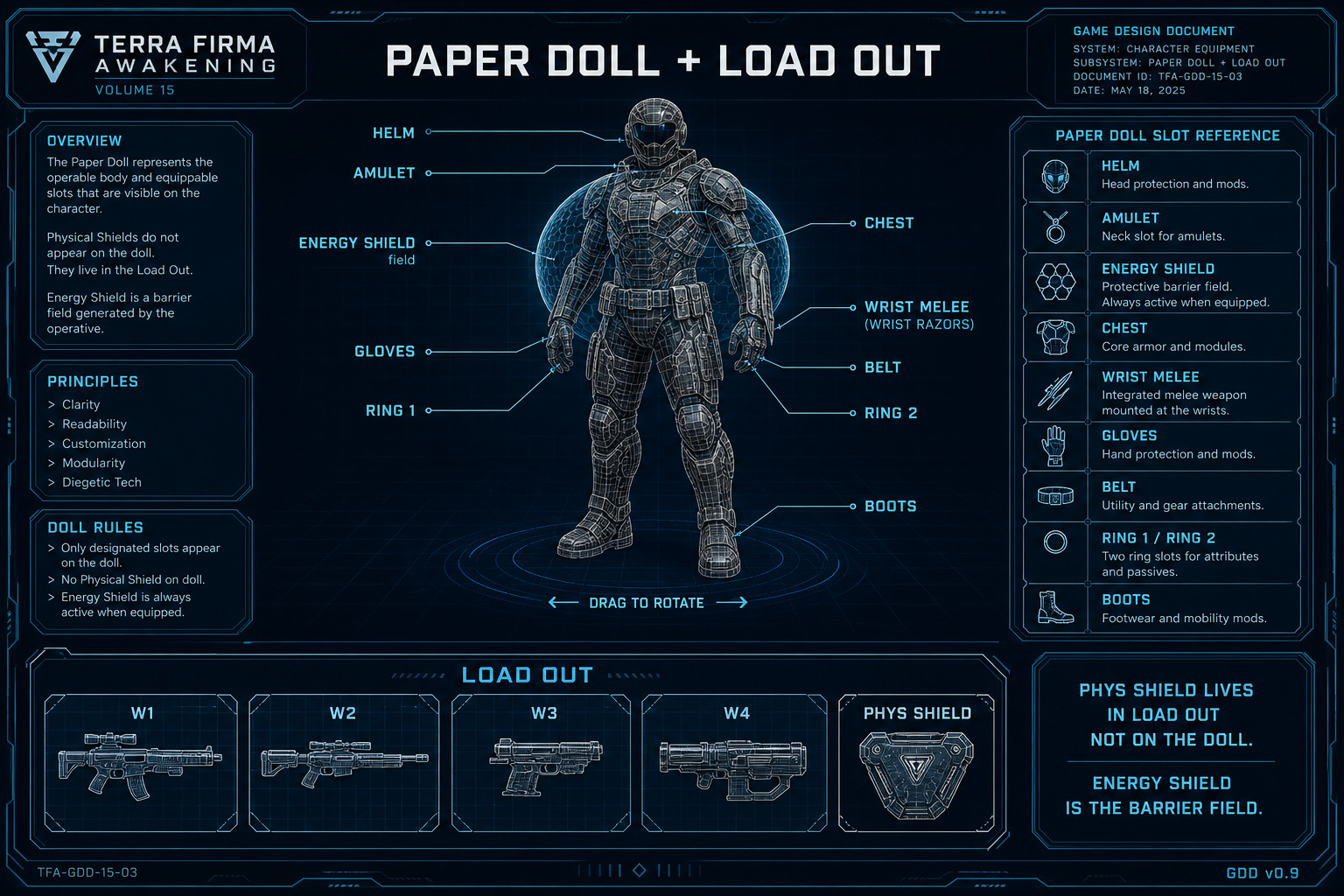
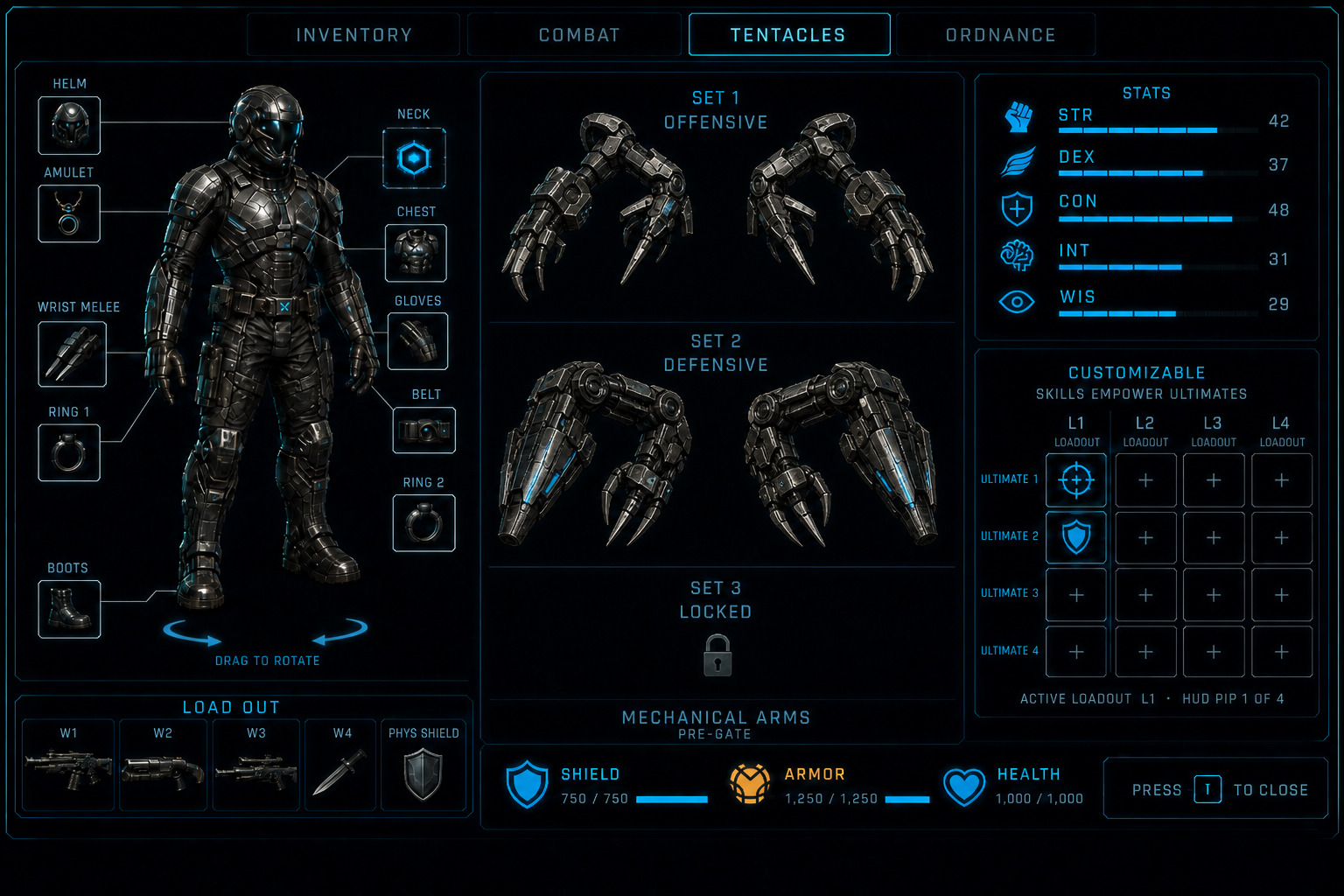
Section titled “Paper doll + LOAD OUT”Callouts sit on the body part they belong to. Physical Shield is not a doll callout — it lives in LOAD OUT with the four weapons. The Tentacles tab is the exception: the doll snaps to a back view and swaps gear callouts for three torso mounts. The Ordnance tab keeps the front doll and gear, and adds one grenade socket on the hip.
- HELM → head. AMULET → neck. CHEST → chest plate. BELT → waist belt. BOOTS → feet.
- GLOVES → gauntlets. RING 1 and RING 2 → hands (labels are Ring 1 / Ring 2, not Hands).
- WRIST MELEE → wrist. Icon is a pair of forearm wrist razors, not a handheld knife.
- ENERGY SHIELD → Barrier field on the torso. Never a Physical Shield board.
- LOAD OUT under the doll: W1 W2 W3 W4 plus PHYS SHIELD.
- Tentacles tab: doll faces away. Only three attachment points draw — Upper torso, Mid torso, Lower torso. Drag a learned tentacle onto a mount. Each tentacle skill is already Offensive or Defensive — there is no Off / Def toggle. One tentacle per mount. Right-click a mount to clear it. Gear callouts hide while this tab is open.
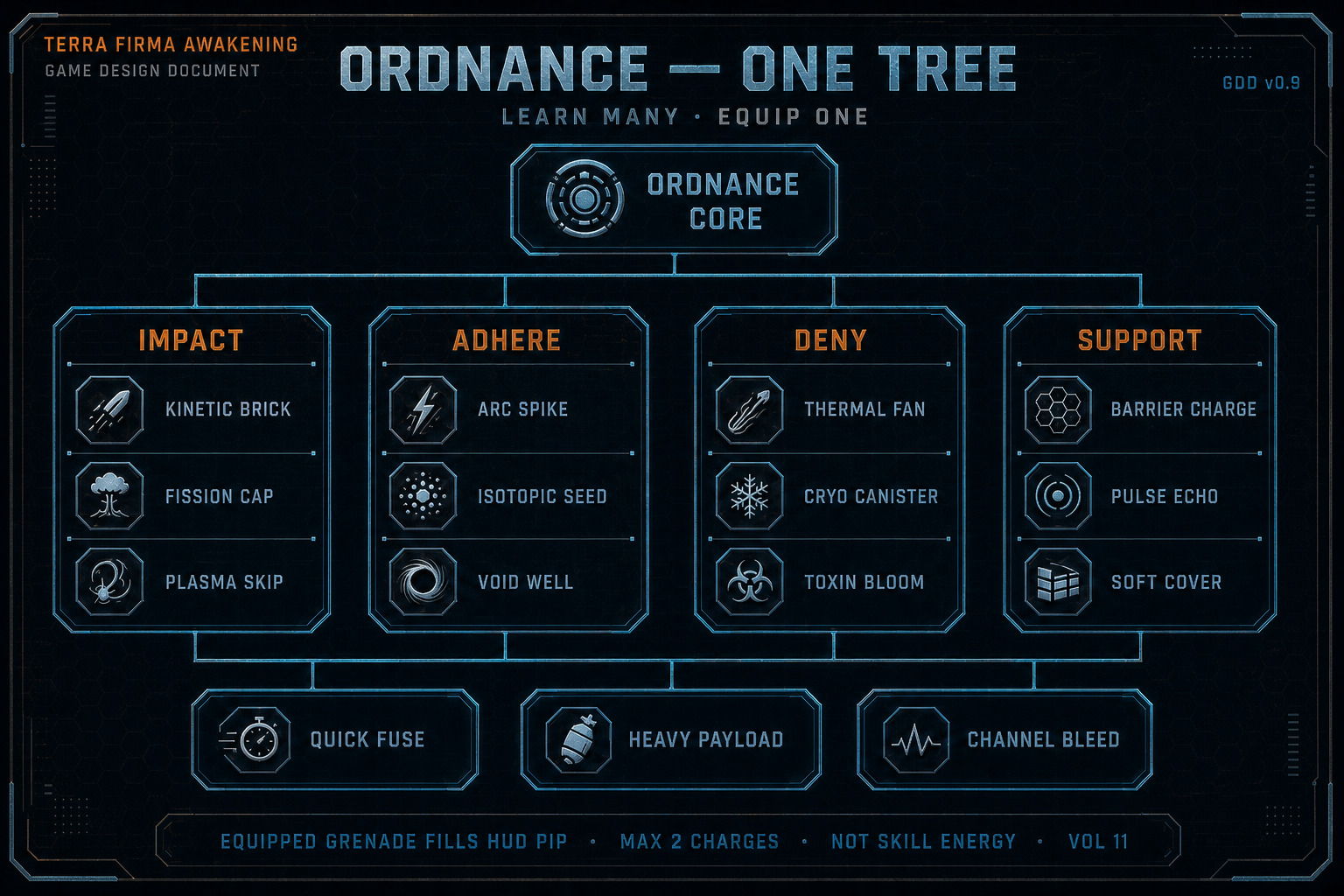
- Ordnance tab: one grenade socket on the hip. Drag a learned grenade onto it. Only one grenade is active at a time. Dropping another replaces it. Right-click clears. Grenades cannot socket the Customizable dock.
- Working attributes: STR, DEX, CON, INT, WIS. Energy stays a pool, not a sixth attribute.
- Character level and an XP bar sit on the STATS strip. + spends an unspent point. − returns it before Commit. Commit locks the spend.
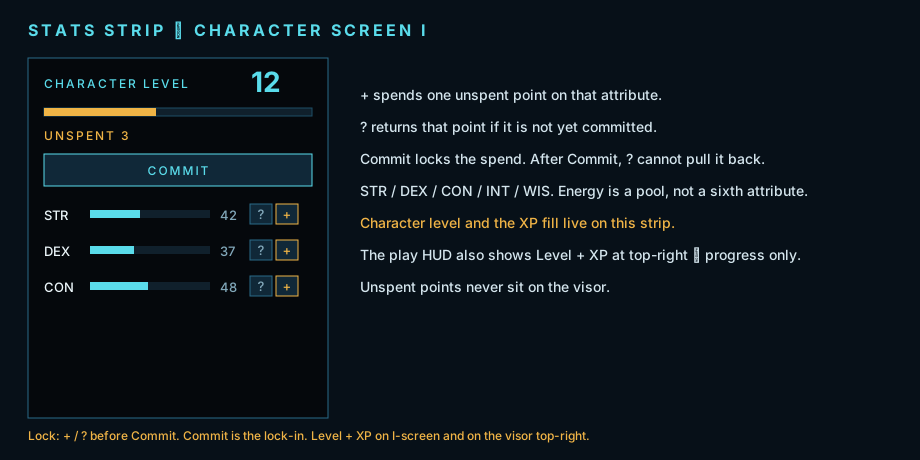
Lock plate. Character level + XP, unspent points, + / −, and Commit on Character screen I.
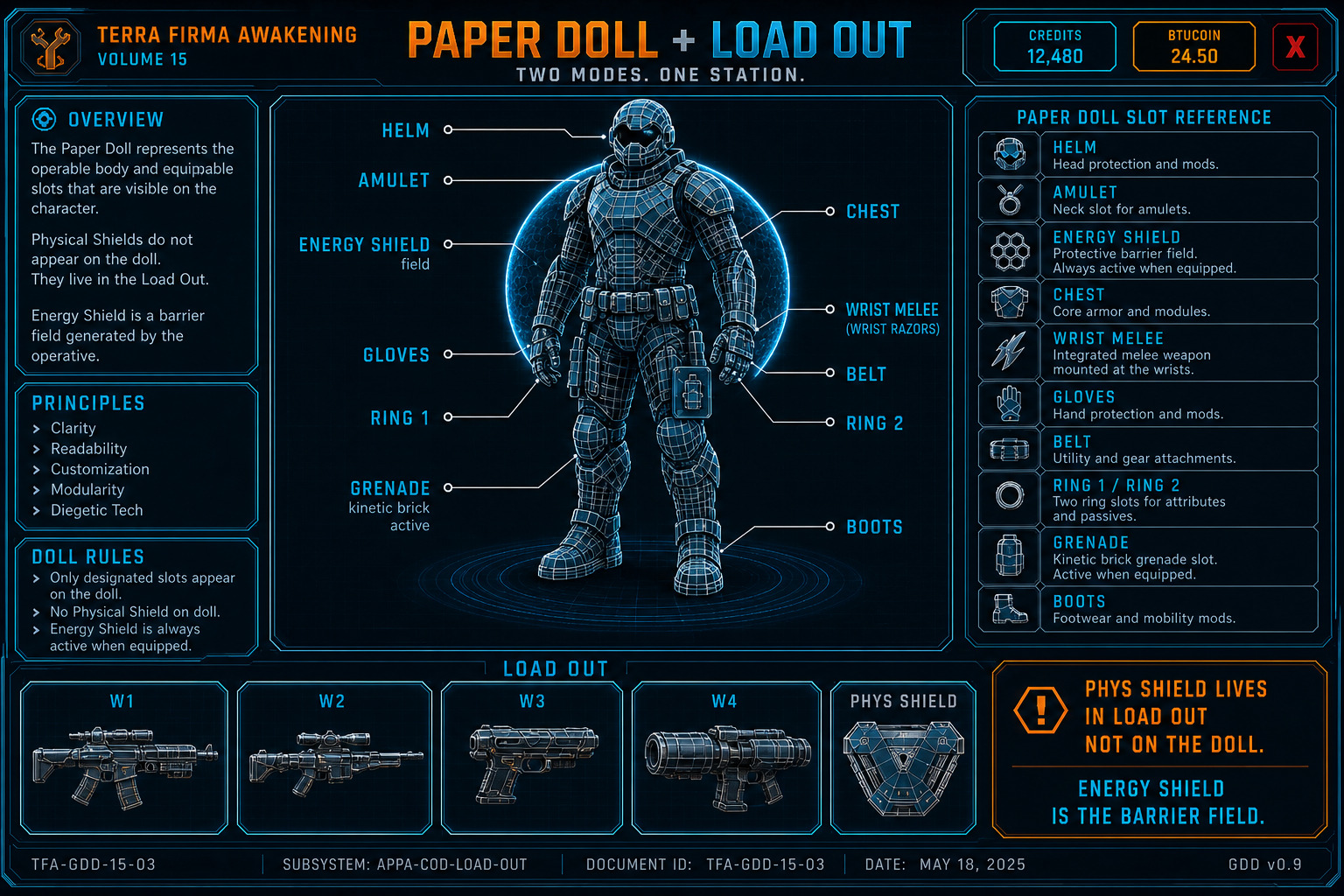
Figure OV13. Paper doll callouts and LOAD OUT. Phys Shield is in LOAD OUT. Energy Shield is the Barrier field. Doll rotates. Header keeps a reserved wallet pocket so Credits and Currency never sit on the title.
Customizable dock
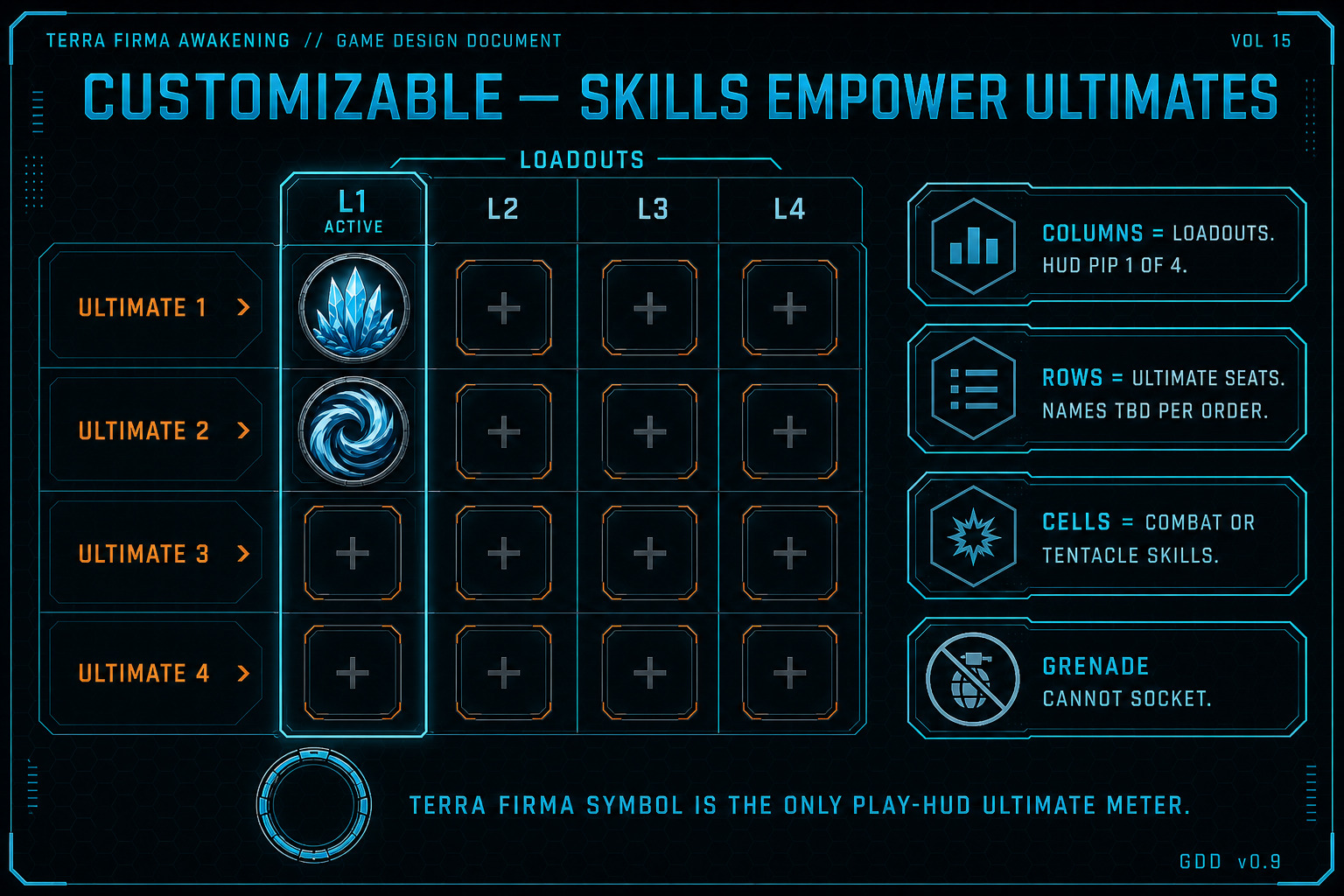
Section titled “Customizable dock”The 4×4 is the Ultimate empowerment matrix, not a second bag. It sits in the same place on every I-tab. Empty cells still draw.
- Columns L1–L4 = loadouts. Active column is highlighted. HUD pip is 1 of 4.
- Rows = Ultimate 1, Ultimate 2, Ultimate 3, Ultimate 4. UI labels stay numbered.
- Display names of the actual Ultimate skills are TBD per Order / subclass.
- Each cell is a Combat or Tentacle skill (or item-granted skill) that empowers that Ultimate in that loadout.
- Ordnance grenades cannot socket here and do not empower Ultimates.
- The Terra Firma symbol on the play HUD is the only Ultimate meter. This dock is pause-only.
Inventory bag + item sockets
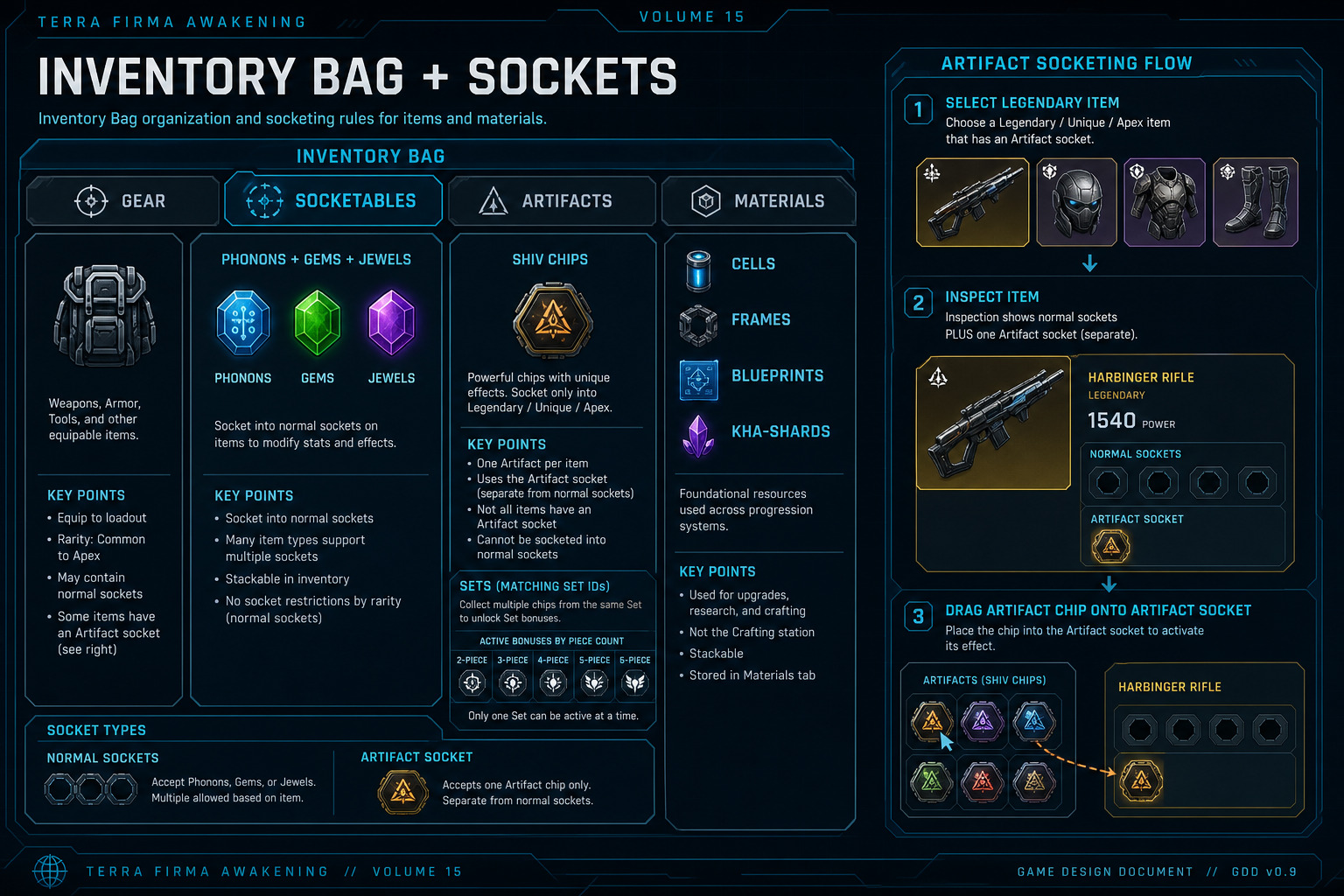
Section titled “Inventory bag + item sockets”Inside the Inventory tab, three inner tabs: Gear · Socketables · Artifacts. Phonons, Gems, and Jewels share Socketables. The Artifacts bag holds chips. Sets are Unique / Apex item pieces — Legendary never. There is no Materials bag. Forge is the Inventory → Gear workbench after maximize. Refit is on Inspect for Augmented / Rare guns and melee. Bore is on Inspect for chip wells. Selecting a gear item opens Inspect.
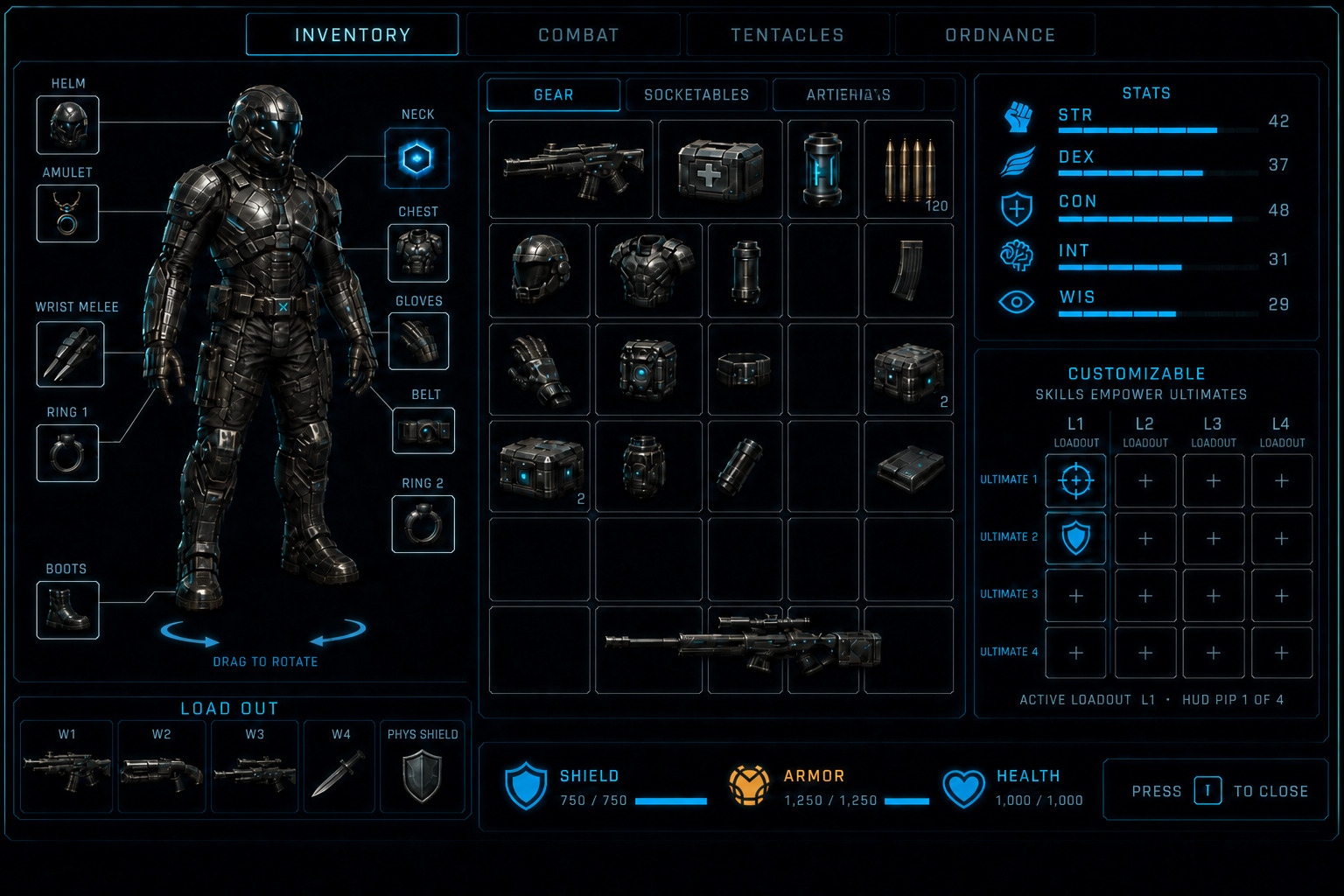
- GEAR — guns and armor. No ammo. Click or right-click opens Inspect. Compact Forge chip sits on this panel header. Hitting it (or Maximize) auto-maximizes over stats and the dock: Forge fills everything except the paper doll and LOAD OUT. The Gear bag hides until Minimize. Same slot size when the bag returns — it does not zoom the tiles. You can only Forge if the Gear bag has room for that item (wide Frames need two empty slots). The paper doll and LOAD OUT stay. The Forge recipe list is long: a search field, Armor / Weapons chips, Ranged / Melee once Weapons is selected, and a rarity chip on every view. World mats have their own scrollbar in the stack rail; recipes scroll in their own column. Socketables / Artifacts maximize is still a full bag with no workbench. Inventory has no tree pan and no wheel zoom.
- CREDITS + CURRENCY — sit on the Character I title bar only, in a reserved pocket left of the window X: CREDITS chip, a gap, CURRENCY chip, then the X. Persistent on Inventory, Combat, Tentacles, Ordnance, and Channels. The two chips never overlap each other, never cover a tab, never cover the X. Not a second pair on the bag header. Not bag tiles. Not the menu Credits roll. Currency is the player crypto share (token name TBD). Daily tasks, weekly tasks, and hard objectives mint crypto (51% studio / 49% player) — Online only; they live on Local Map, World Map, and in the world with other game objectives. Convert on Marketplace Wallet.
- AMMO — never a bag tile. World ammo bricks auto-pick up into the OmniVisor ammo counter (Field / Specialist / Siege reserve) until that brick’s cap. At cap the player cannot pick up more; leftover bricks stay on the ground. Caps TBD.
- SOCKETABLES — Phonons, Gems, and Jewels on one page (vol. 08 trinity).
- ARTIFACTS — Shiv interface chips. Socket only into Unique / Apex. One Artifact per item. Legendary never has an Artifact socket. Artifact socket is separate from Phonon / Gem / Jewel sockets. Sets are Unique (and Apex) item pieces: matching Set ID + piece index on the Unique / Apex. Legendary never carries a Set ID and never feeds 2 / 3 / 4 / 5 / 6-piece bonuses. Unique may be standalone (no Set ID) or a Set piece. Worn SetIDs unlimited; Active Sets under ASBP=6 (FS-ITM-004). Thresholds 2 / 3 / 4 / 5 / 6-piece per active Set.
- Inspect: weapon stats always draw on this page (cadence string + Impact / Range / Stability / Handling / Reload / Mag or Cell / Recoil / Accuracy on guns; Damage / Block / Speed / Knockback / Channel on melee). Weapon trackers (
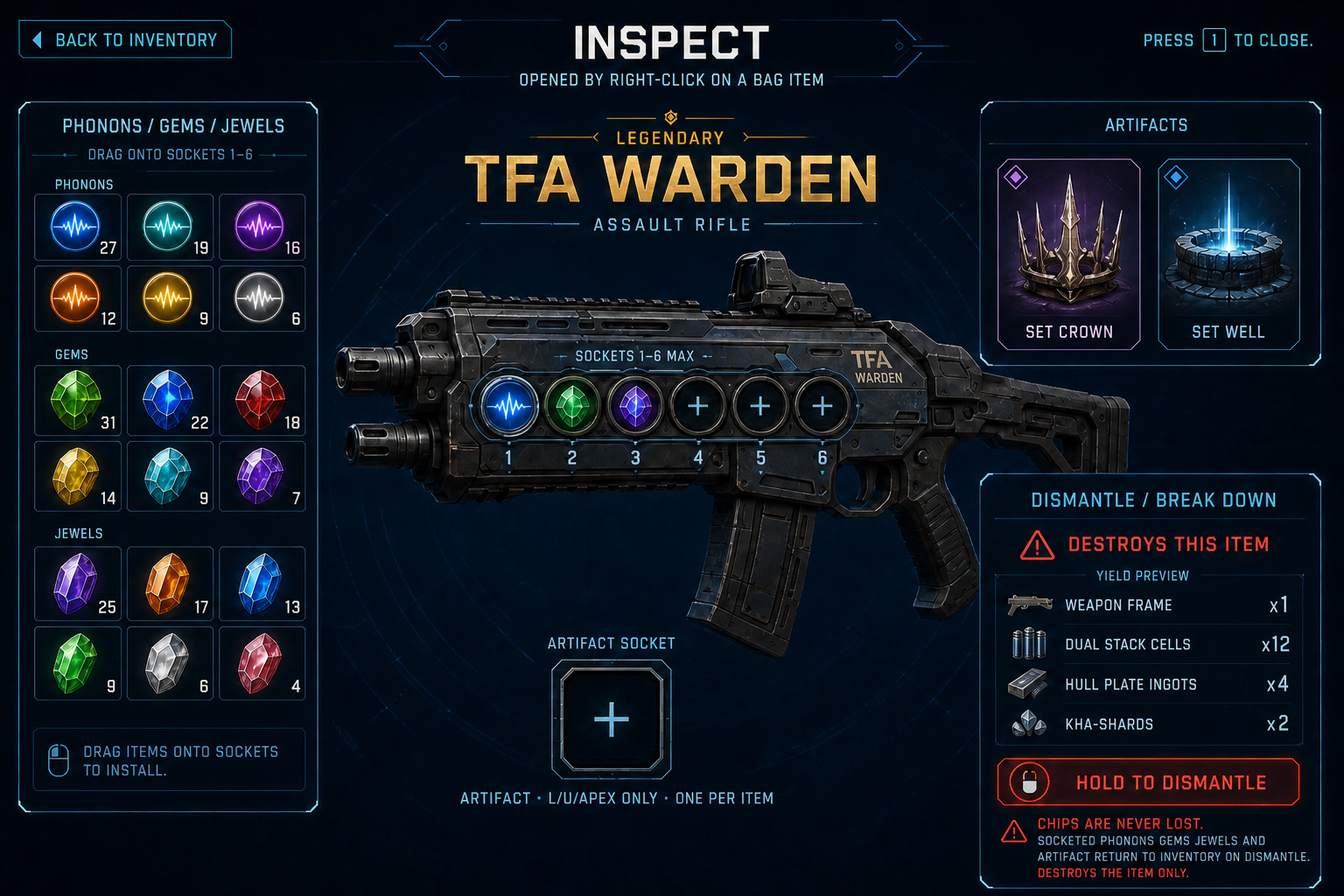
W_TFA_Inspect_Trackers) sit below the stat plate on gun and melee Inspect only — per item instance lifetime: Kills, Precision kills, Precision %, Assists, Damage dealt, Time equipped, Best kill streak. Server-owned on Online; local on Solo. Refit preview ghosts the stat plate — trackers do not ghost. Armor / jewelry / shields never draw trackers. Match Results expand rows show per-slot stats for that match only; Inspect shows lifetime on this gun. Family career totals live on Command Deck Collections → Weapons (**Command Deck Career Records). Cadence and Impact are Frame — they do not ghost. Up to 6 Phonon / Gem / Jewel sockets (hard cap). Birth count = base type + item level. Bore on Inspect spends Well Tap + Dual Stack Cells to open one more well, never a 7th. Open empty wells draw numbered and take Phonons / Gems / Jewels. Unopened wells still draw to the 6 cap as locked (no drop). Chip strip is separate from part callouts. Artifact socket is not a Bore well. The left column is a picker with tabs Phonons / Gems / Jewels; Unique / Apex add an Artifacts tab. Drag an Artifact onto the Artifact socket (one per item). The Artifact tab is Inspect-only; Character I still has its own Artifacts bag (OV23). Unique / Apex also show one Artifact socket. Legendary Inspect never shows an Artifact socket or Artifacts tab. Augmented / Rare guns list five part sockets with Refit: Barrel, Mag / Cell / Quiver, Optic, Stock / Brace, Grip. Melee lists Head, Guard, Haft, Weight, Core. Empty part sockets still draw (family baseline). Select an owned variant to preview — the stat plate ghosts + / −. Preview is free. Install writes one socket and pays that socket’s family mix at the item’s rarity + Dual Stack Cells. Armor / jewelry / shields / Mechanical Arms / Legendary / Unique / Apex have no Refit and no Install. Apex Inspect is its own still (OV33) and still shows stats. Forge new items on the Inventory maximize workbench. Rewrite is a separate Inspect chip (OV34) — not Refit, not Install, not Forge. - Rewrite: Augmented / Rare guns, melee, armor, jewelry, and shields show a Rewrite chip on Inspect with Reroll and Change. Legendary / Unique / Apex also show Rewrite but Reroll only — Change is hidden; empty wells cannot be filled. Mechanical Arms and Common never. Uncommon default off. Socketable jewel chips do not Rewrite; doll jewelry items do. Rewrite opens a full child window above Inspect (
W_TFA_Inspect_Rewrite). Not a Forge park well. Reroll keeps the affix group and rolls a new named affix + band inside it — you cannot pick Terminal vs Razor by name. Empty wells cannot Reroll. Change (Augmented / Rare only) pays a group sigil, picks a different family, then rolls; it may fill an empty legal well (Rare ≤3+3, Augmented ≤1+1) and cannot duplicate a group already on the item. Staff / Scepter refuse Combat prefixes on Change. Odds preview is free (three-step bias meter; never 100%). Etch is the click that pays and writes one slot (not a hold — hold stays dismantle / Invoke). Prefix spends Forge Stamp at the item’s rarity; suffix spends Telemetry Coda; every Etch spends Dual Stack Cells; Change also spends one group sigil; Channel groups also spend the matching Gem. Overpay 0–3 matching reagents + Cells weights the low/mid/high table. Exact counts TBD. Cannot write Frame, cadence, parts, Phonons / Gems / Jewels / Artifact, or InvokeEligible. Online: browse OK; Etch fail-closed in combat or downed. - Bore: Inspect spend that opens one Phonon / Gem / Jewel well, up to the hard cap of 6. Material is Well Tap (Crafting stack, one pile, no rarity stamp) plus Dual Stack Cells. Not Forge. Not Refit. Not Install. Not Rewrite. Not a park well. Does not fill the new well. Cannot add a 7th chip well, cannot add or remove the Artifact socket, cannot add part sockets, cannot change seated chips, Frame, cadence, affixes, or InvokeEligible. Who: guns, melee, armor, jewelry, shields that have chip wells, including Legendary / Unique / Apex (authored birth count, player may Bore to 6). Mechanical Arms never. Ammo never. Common / Uncommon Chord bases never — socket count is Chord length (
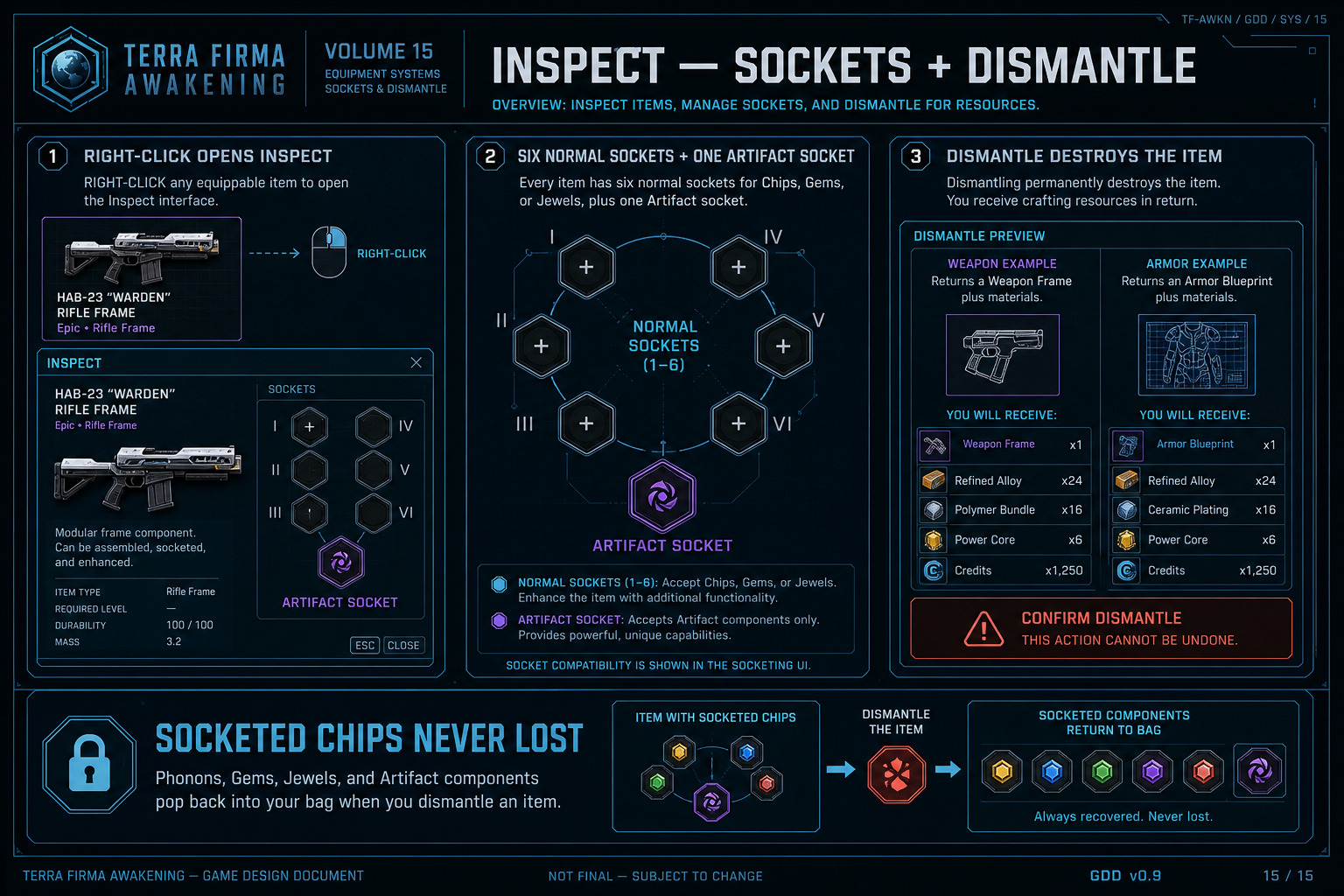
FS-ITM-007). Jewel chips themselves do not Bore. Exact Well Tap / Cells counts TBD (lab floor 1 Well Tap + 8 Cells × the next well index). Online: browse OK; Bore fail-closed in combat or downed. - Dismantle / break down is on Inspect. Preview the yield first. Weapons return the matching Weapon Frame for that family and rarity plus mats onto Crafting stacks. Armor returns the matching Armor Blueprint for that armor type and rarity plus mats onto Crafting stacks. The item is destroyed. That typed Frame or Blueprint stays unlocked on the Crafting Page forever — later crafts of that key do not need another salvage. Augmented / Rare weapons also unlock each installed part variant (Family × Socket × Variant).
- Apex quality items on Inspect show Invoke Power only if that Apex was found in the world (drops, missions, pinnacle, named loot). Legendary / Unique never Invoke. Players can still craft Apex from the matching Armor Blueprint or Weapon Frame plus materials — that output is Apex quality (sockets, Artifacts, Ultimate synergy) but cannot be invoked. The stamp is on the item at creation; trading or mailing a crafted Apex does not turn Invoke on. Invoke grants every unowned main class (Enforcer / Arcwarden / Phantom) at the current level of the player’s highest owned class, including the Combat skill points needed to equal that class’s earned Combat budget, and subclass gates for that class level (TBD-029). Combat-tab Unlock (XP tax, new class starts at 1) is a different path. After Invoke, more than one class is owned, so later class XP still pays the multiclass tax. Confirm, then hold. There is a chance the world-found Apex breaks (TBD-030). Break returns socketed chips to the bag and destroys the item. Break is not salvage: no Weapon Frame / Armor Blueprint. If all three main classes are already owned, or the Apex is crafted, Invoke is unavailable.
- Socketed Phonons, Gems, Jewels, and Artifact are never lost. They return to the bag on dismantle or Apex break.
- CRAFTING — Inventory → Gear workbench after maximize (`W_TFA_CraftingPage`). Dual Stack Cells and Kha-Shards stack as themselves. Weapon Frames and Armor Blueprints are unlock keys, not generic piles: each gun / melee family + frame + rarity is its own Frame key; each armor type (slot × Light / Medium / Heavy) + rarity is its own Blueprint key. World mats (Ferrospine, Weldalloy, Optic Lens, Helion Prism, Sealant Mesh, Capacitor Coil, Warhead Compound, Limb Filament) stack by SKU + rarity. Forge Stamp and Telemetry Coda do the same. Well Tap stacks as itself (one pile). Nanite Residue is Legendary / Unique / Apex only. Weapon parts are not bag tiles — they unlock here like Frames. Forge fills everything except the paper doll and LOAD OUT; the Gear bag hides until Minimize. You can only Forge if the Gear bag has room for that item (wide Frames need two empty slots). The catalog is a long list: search by name, Armor vs Weapons, then Ranged vs Melee inside Weapons, and a rarity chip (Common through Apex, plus All). World mats have their own scrollbar in the stack rail; recipes scroll in their own column. This is not a Materials bag and not a sixth top tab (Channels is the fifth). Refit is on Inspect for Augmented / Rare guns and melee — not a park well, not a workbench mode. Rewrite is on Inspect for Augmented / Rare guns, melee, armor, jewelry, and shields — also not a park well. Bore is on Inspect for chip wells — also not a park well. Hubs and unlocked field fabricators host the same Forge page with a station bonus, not exclusive access. Online overlay: browse OK; Forge / Refit / Rewrite / Bore / repair fail closed in combat or while downed. Solo pause has full access. No Cube item.
- Item socket page: large item, numbered chip sockets 1–6 (open empties droppable; locked wells draw to the cap). Drag Phonon / Gem / Jewel onto an open chip socket. Bore opens the next locked well. Unique / Apex: Artifacts tab, drag onto the Artifact socket. Legendary: no Artifact socket. Back returns to Inventory.
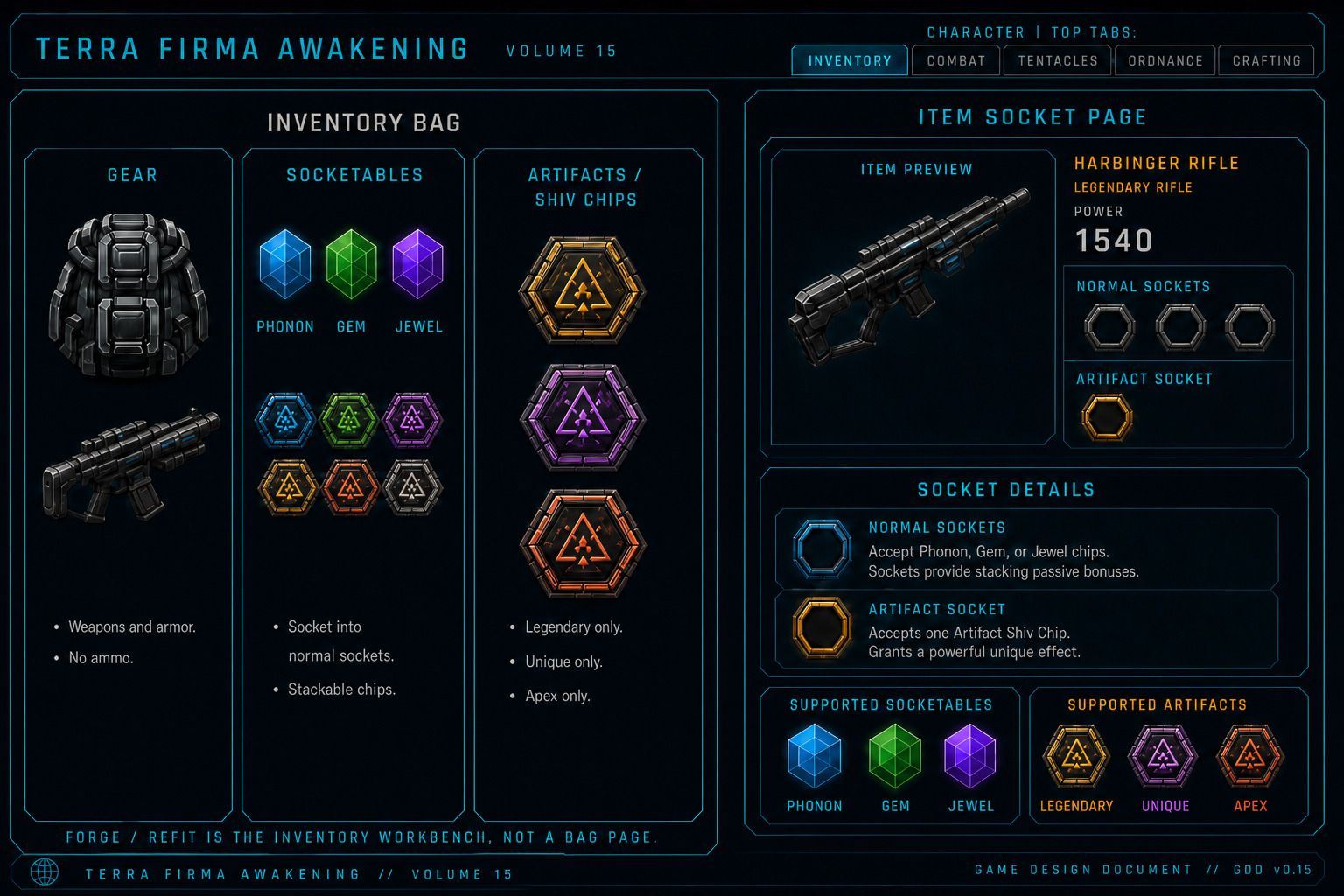
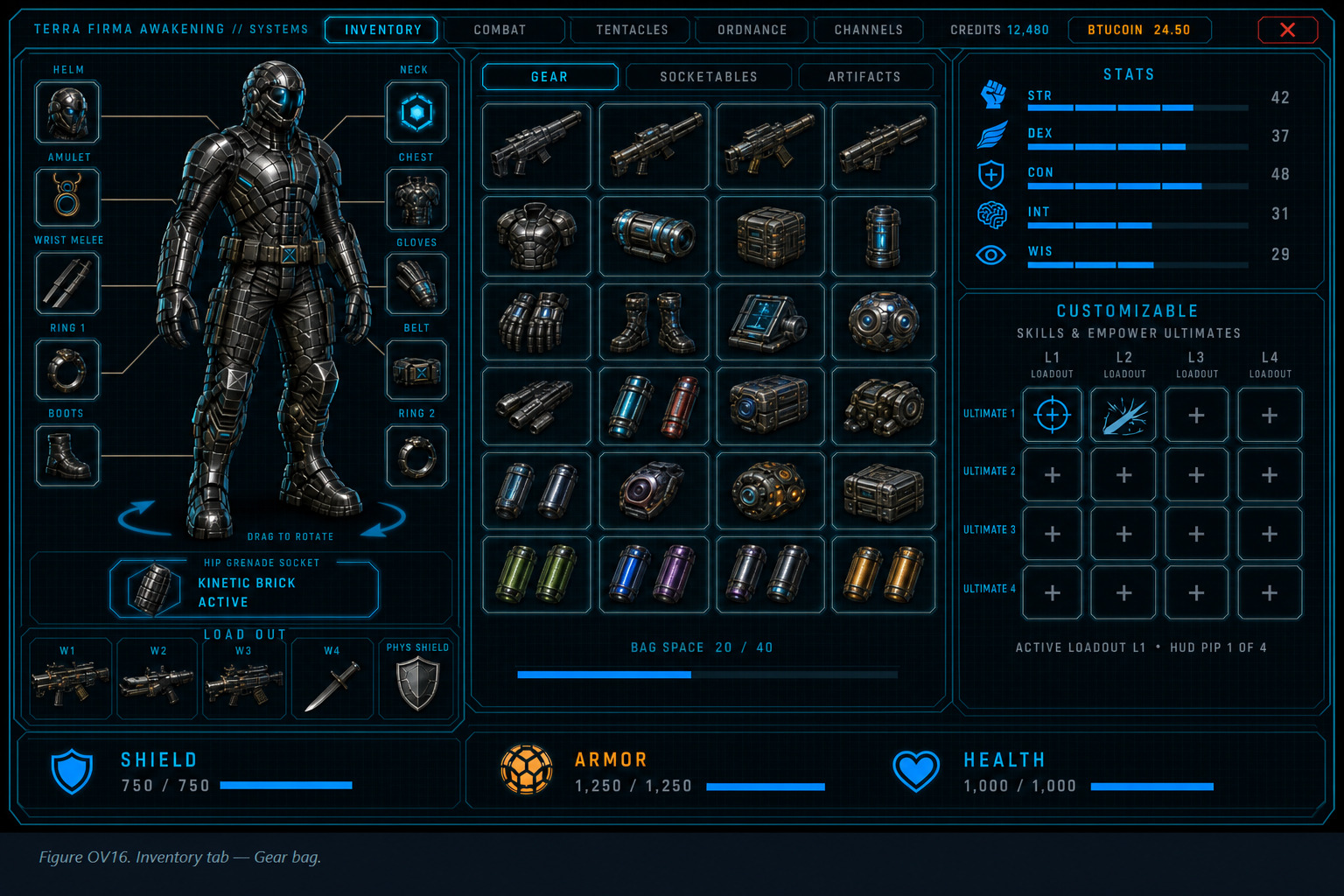
Figure OV16. Docked Inventory / Gear — bag-only center, Forge chip on the panel header, rotatable doll, LOAD OUT, Customizable dock. Credits and Currency as two separate title-bar chips.
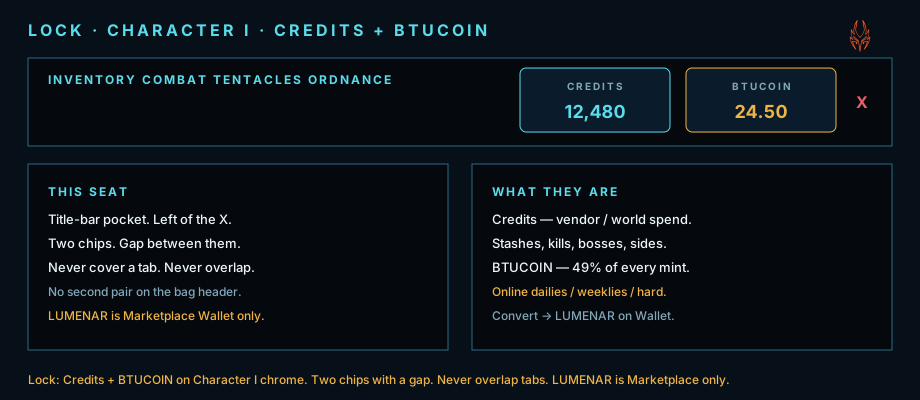
Lock plate. Credits (in-game spend) and Currency (player 49% of every crypto mint). Two chips with a gap, then the X. Never overlap tabs. Not a second pair on the bag header.
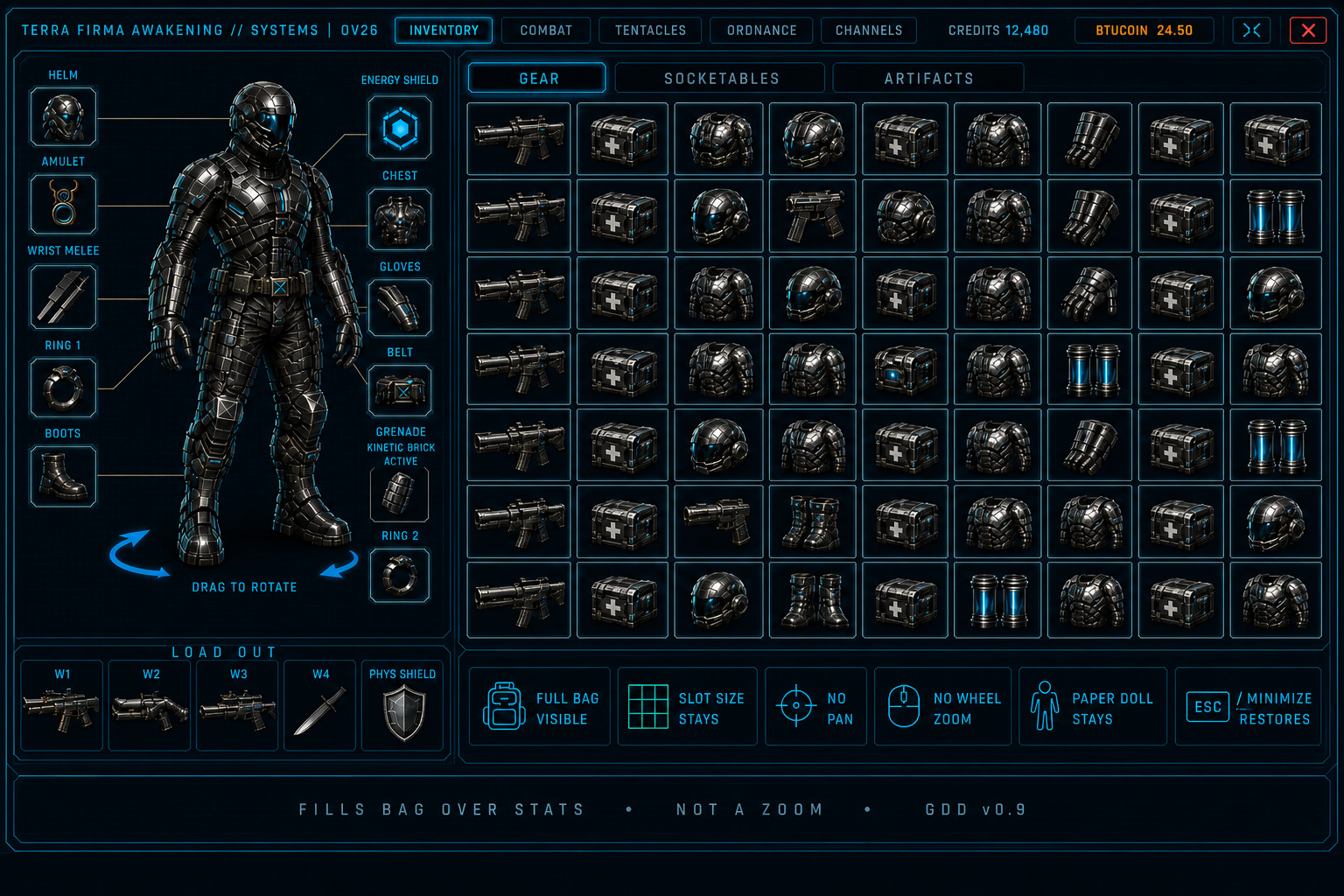
Figure OV26. Socketables / Artifacts maximized. Full bag at slot size — not a zoom. Gear maximize is OV18 (Forge fills except doll). Paper doll and LOAD OUT stay. Minimize (inward arrows, left of the window X, same size, with a gap) or Esc restores docked Inventory.
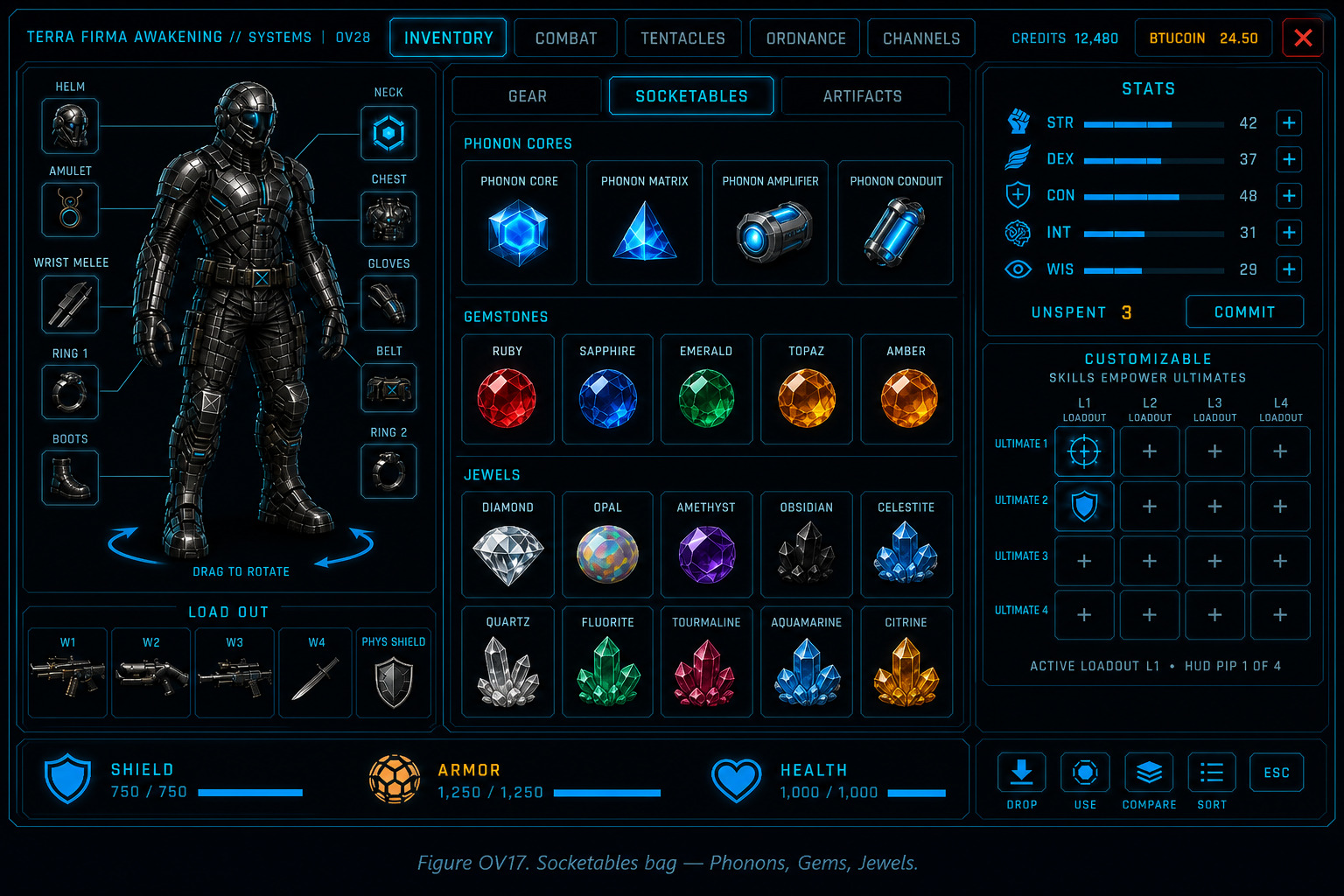
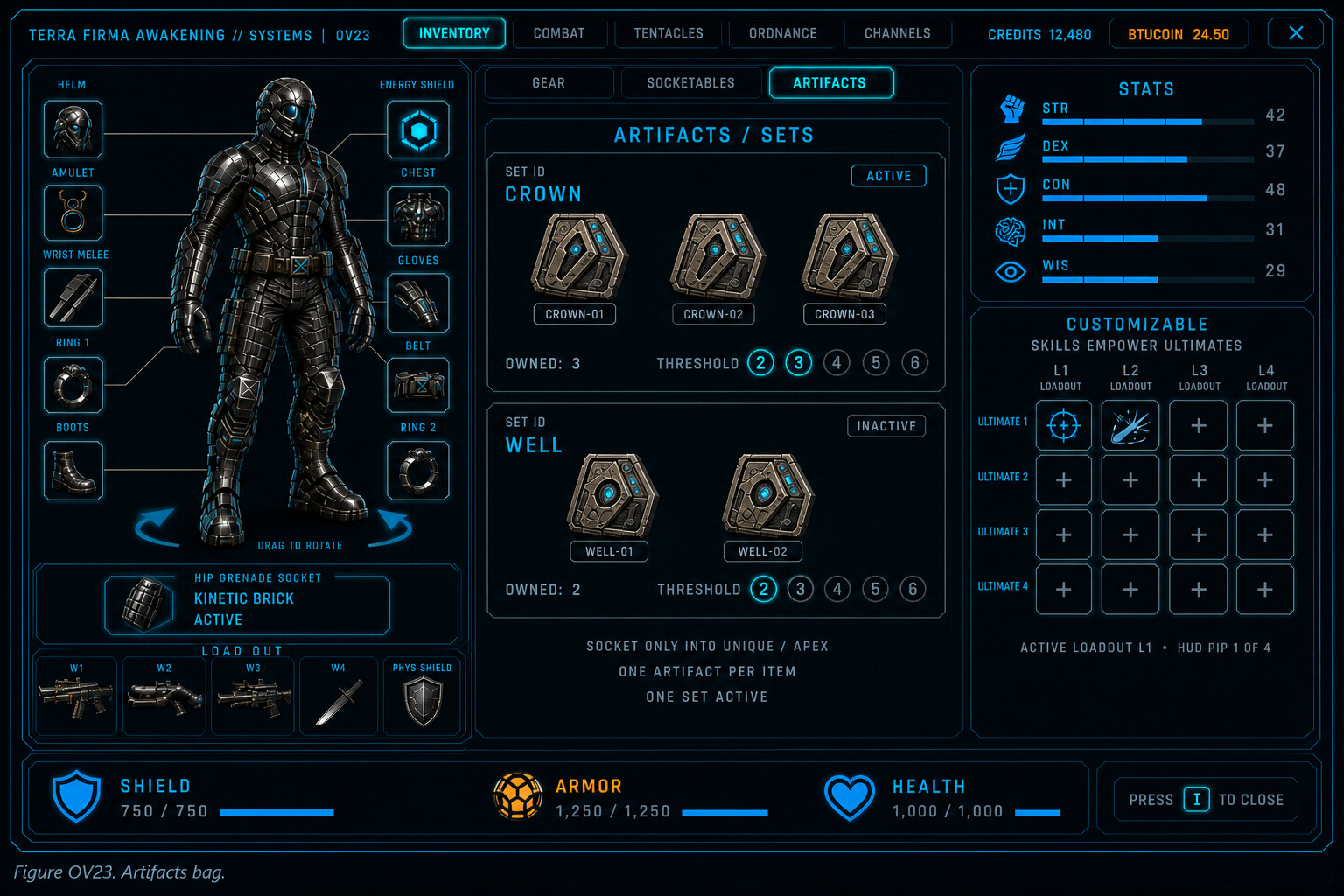
Figure OV23. Artifacts bag — chips. Sets are Unique / Apex item pieces. Legendary never a Set piece. Active Sets under ASBP=6 (FS-ITM-004).
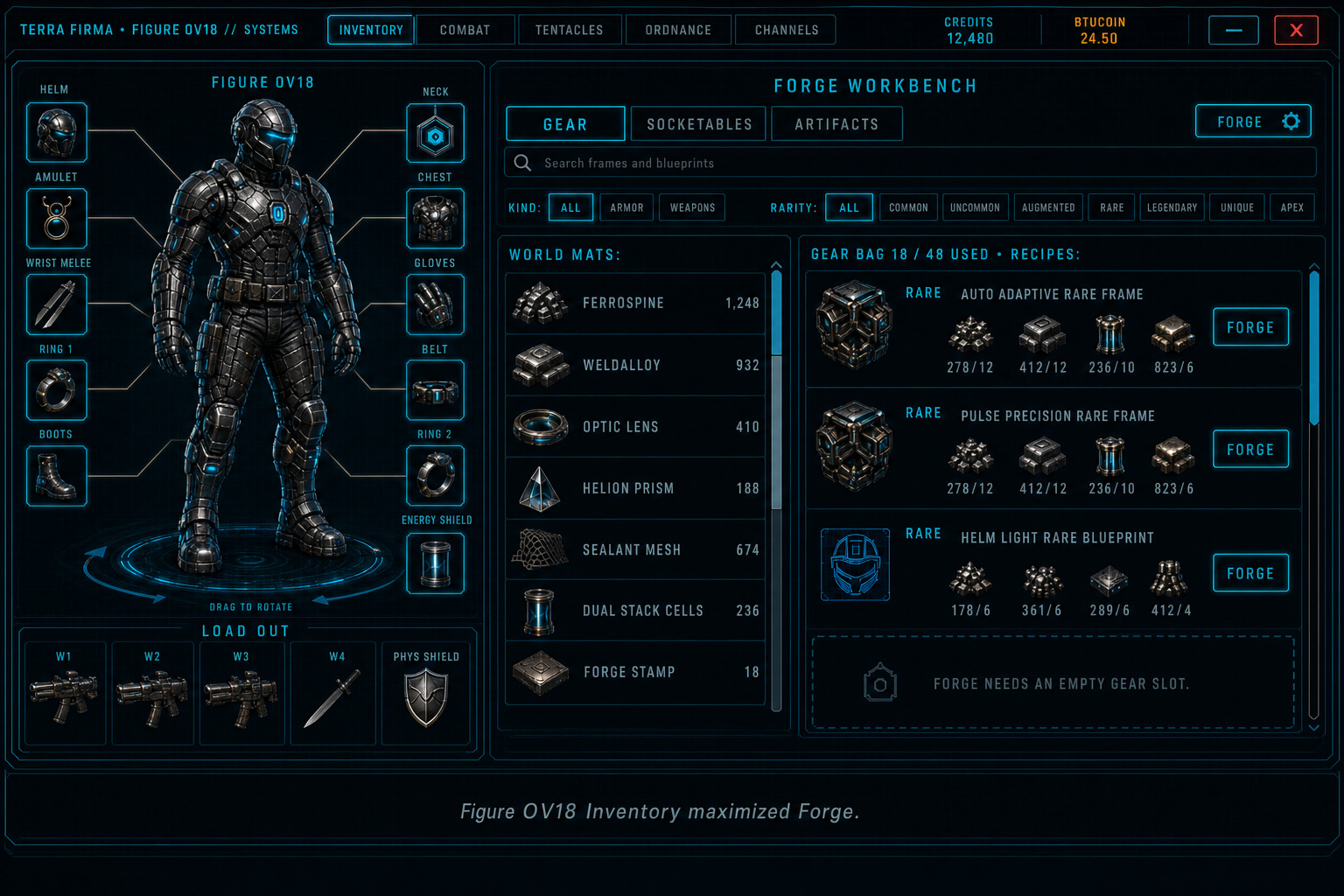
Figure OV18. Inventory maximized Forge — workbench fills everything except the paper doll and LOAD OUT. Gear bag hides until Minimize. You can only Forge if the Gear bag has room for that item. Minimize (inward arrows, left of the window X, same size, with a gap) or Esc restores docked Inventory. Forge catalog: search, Armor / Weapons, then Ranged / Melee, rarity chips, scrolling recipe list and scrolling world-mat rail. Refit is on that item’s Inspect page. Not a park well. Not a sixth top tab (Channels is the fifth).
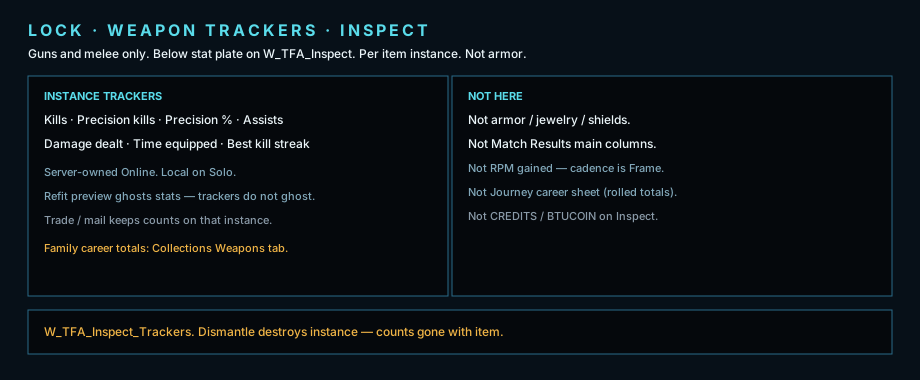
Lock plate. Weapon trackers on gun / melee Inspect — Kills, Precision kills, Assists, Damage dealt, Time equipped. Per item instance. Not Match Results columns. Not armor.
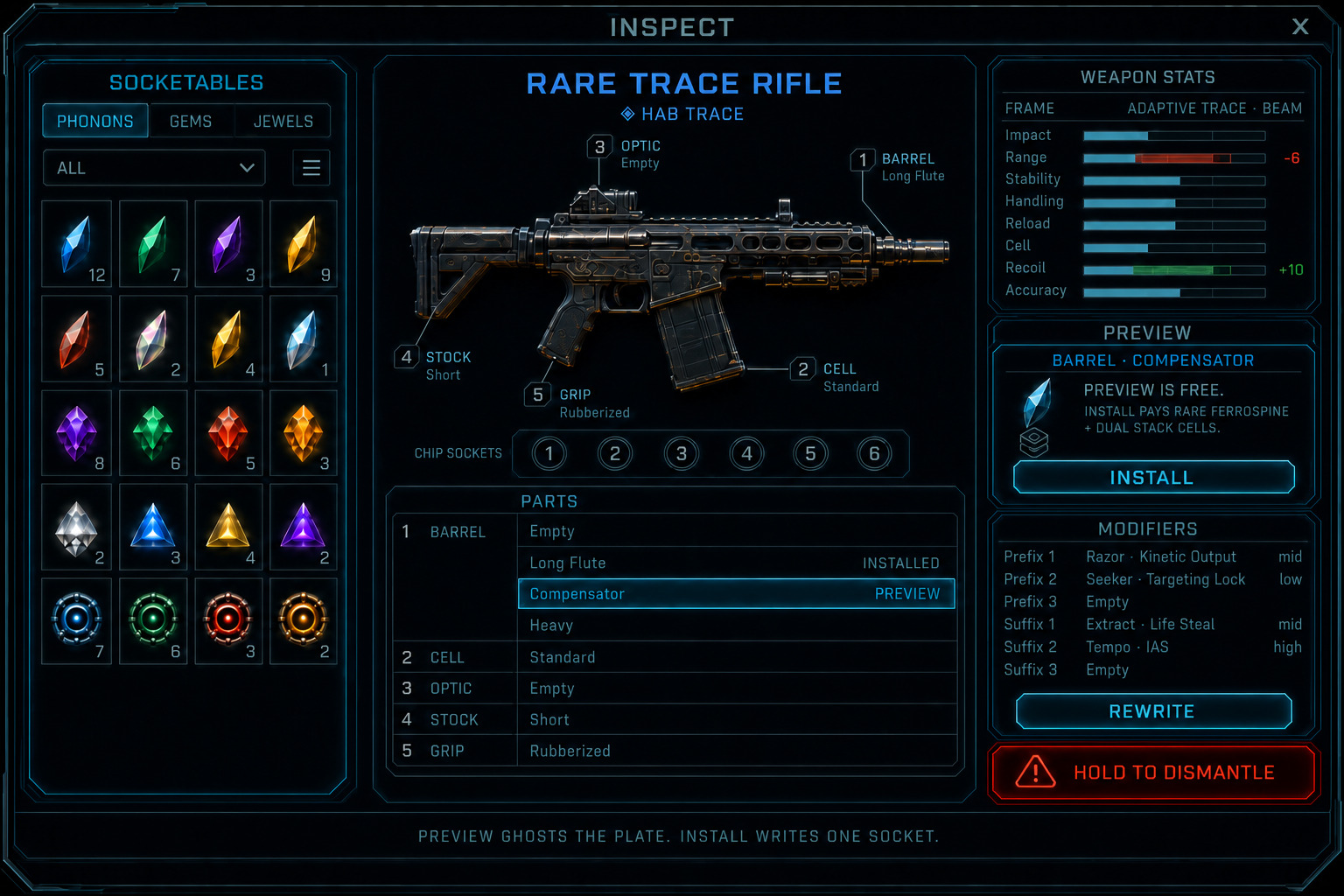
Figure OV19. Inspect — Rare / Augmented Refit. Weapon stats and instance trackers sit on this page. Five part callouts match five sockets. Select an owned variant to preview (ghost + / − on stats only). Preview is free. Install writes one socket and pays. Cadence stays on the Frame. Chip sockets are a separate strip (open vs locked to cap 6). Bore spends Well Tap. Rewrite is its own chip (OV34). Apex is OV33.
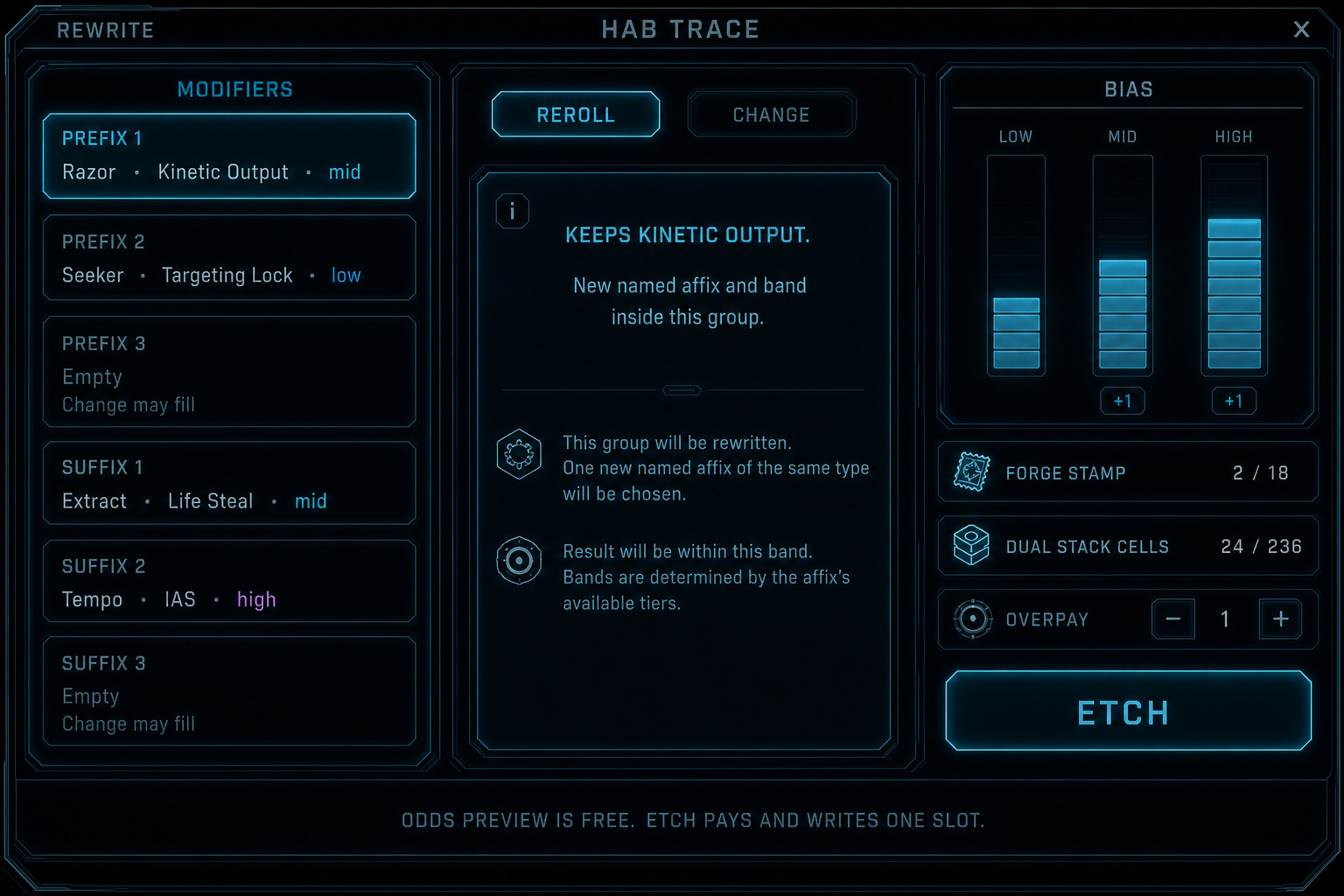
Figure OV34. Rewrite. Child of Inspect. Select one prefix or suffix. Reroll keeps the group. Change pays a sigil and may fill an empty legal well (Augmented / Rare only). Odds preview is free. Etch writes one slot. No CREDITS / BTUCOIN on this window. Legendary / Unique / Apex: Reroll only — Change hidden.
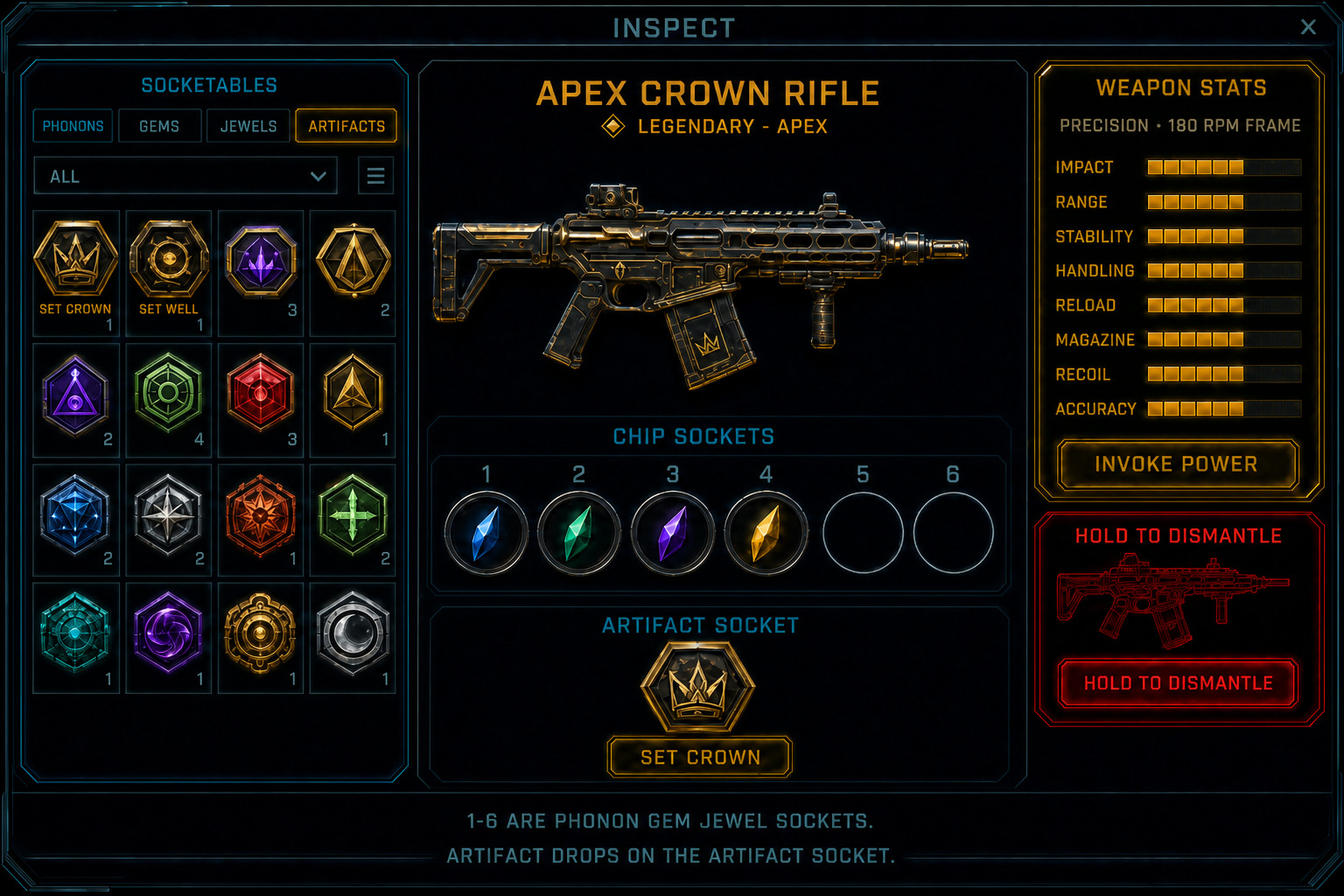
Figure OV33. Inspect — world-found Apex. Left picker tabs: Phonons, Gems, Jewels, Artifacts. Open numbered wells take Phonons / Gems / Jewels only. Locked wells draw to the 6 cap. Drag an Artifact onto the Artifact socket (one per item). Bore spends Well Tap to open one chip well. Weapon stats, Invoke Power, Rewrite Reroll only, dismantle. No modular parts. No Refit. No Install. Crafted Apex skips Invoke.
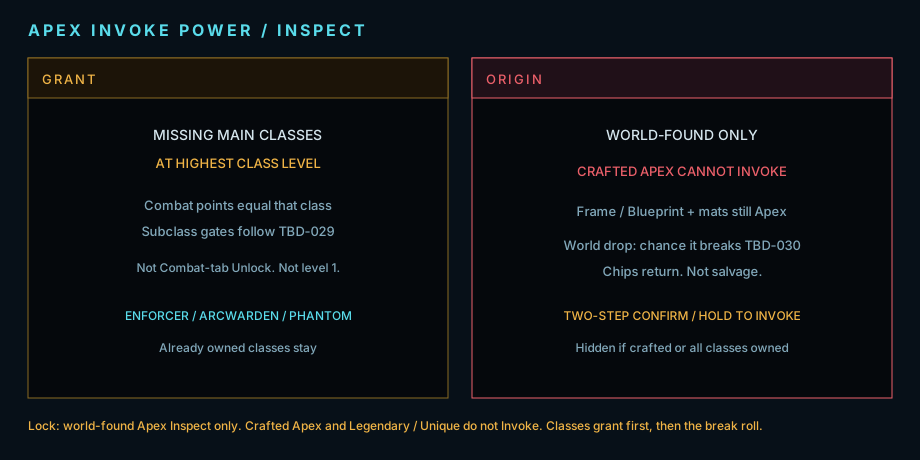
Lock plate. Apex Invoke Power — world-found Apex only. Missing classes at highest class level, Combat points to equal that class, then a break roll. Crafted Apex (Blueprint / Frame + mats) cannot Invoke. Chance is TBD. Chips return if it breaks.
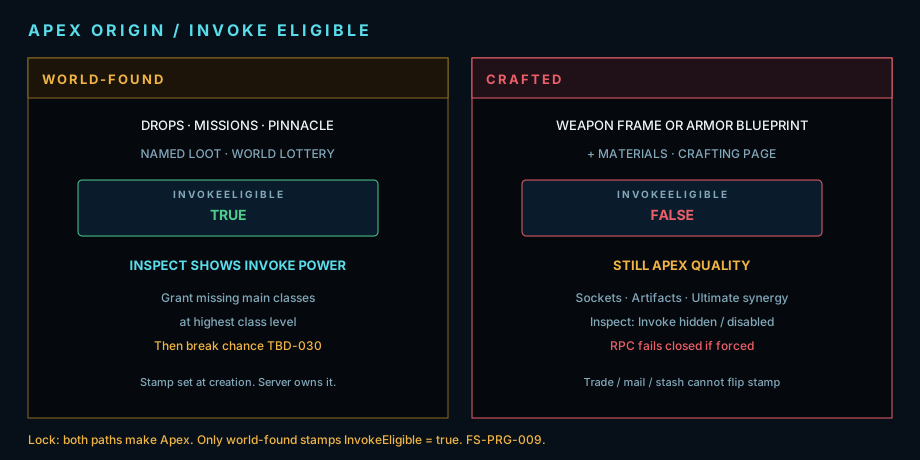
Lock plate. Apex origin — both paths make Apex quality. World-found stamps InvokeEligible = true. Crafted (Weapon Frame or Armor Blueprint + mats) stamps false. Trade cannot flip it.
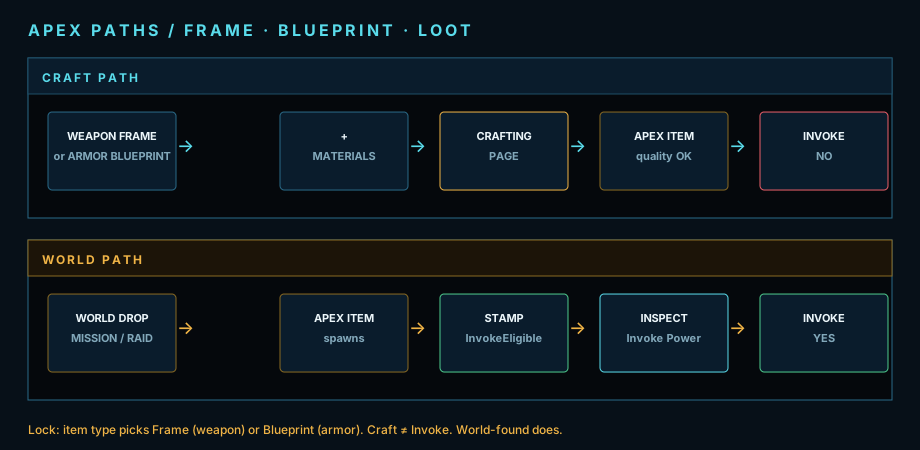
Lock plate. Apex paths — craft uses Frame or Blueprint by item type; output cannot Invoke. World loot stamps InvokeEligible and Inspect shows Invoke Power.
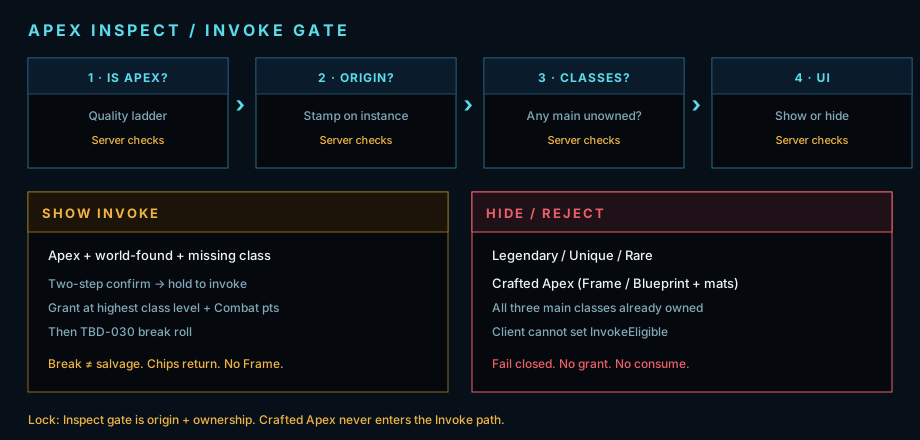
Lock plate. Inspect Invoke gate — show only for world-found Apex with an unowned main class. Crafted, Legendary / Unique, or all classes owned: hide / reject.
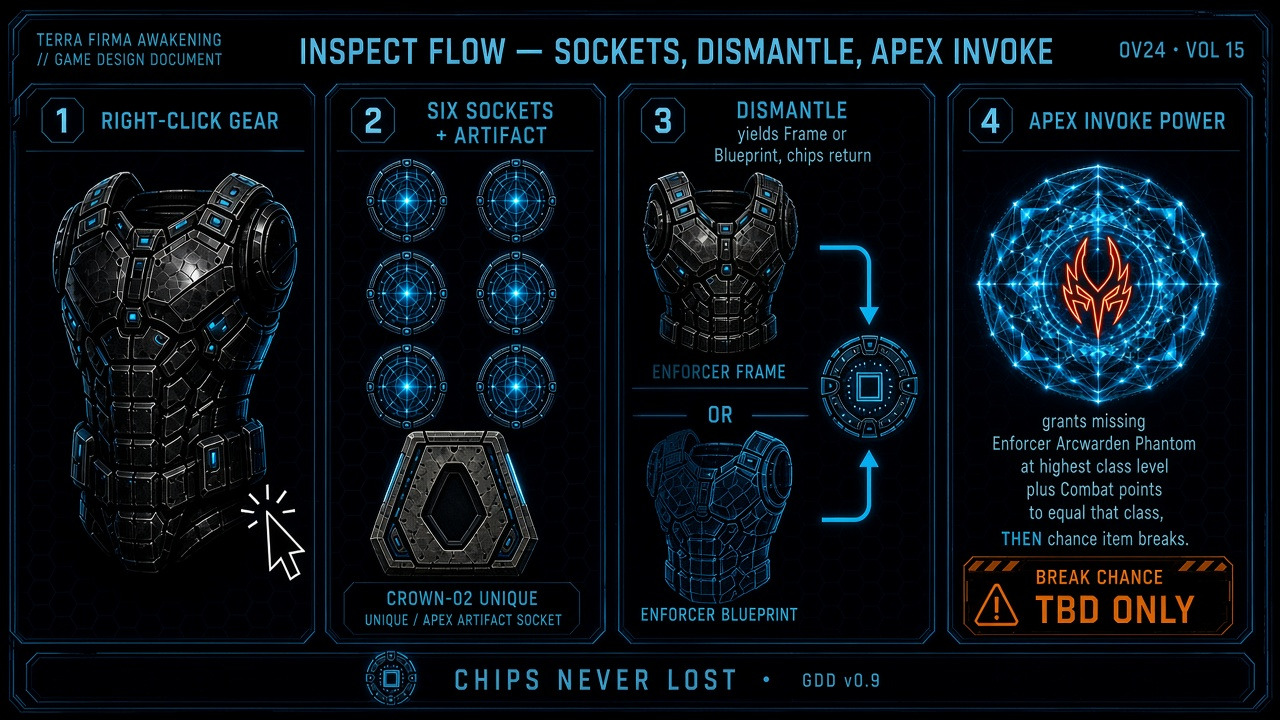
Figure OV24. Inspect flow — right-click sockets + dismantle. Rare Refit is OV19. Rewrite is OV34. Apex Invoke is OV33. Crafted Apex skips Invoke. Chips return to inventory. Dismantle previews Frame / Blueprint + mats onto Crafting. Invoke break is not salvage.
Combat / Tentacles / Ordnance / Channels tabs
Section titled “Combat / Tentacles / Ordnance / Channels tabs”Combat keeps the front doll, LOAD OUT, stats, and Customizable dock. Tentacles keeps LOAD OUT, stats, and the dock, but the doll snaps to a back view with three torso mounts. Ordnance keeps the front doll and adds one grenade socket on the hip. Channels keeps the front doll and LOAD OUT; the center is a scrollable offense / defense channel readout (`W_TFA_I_Channels`) — not a skill tree and not the attribute strip. Only the center panel changes so trees, bags, or the channel list can swap without leaving I.
Create Character does not pick a subclass. You start as the main class (Enforcer / Arcwarden / Phantom). Subclass trees T1–T5 open in roster order as that class levels.
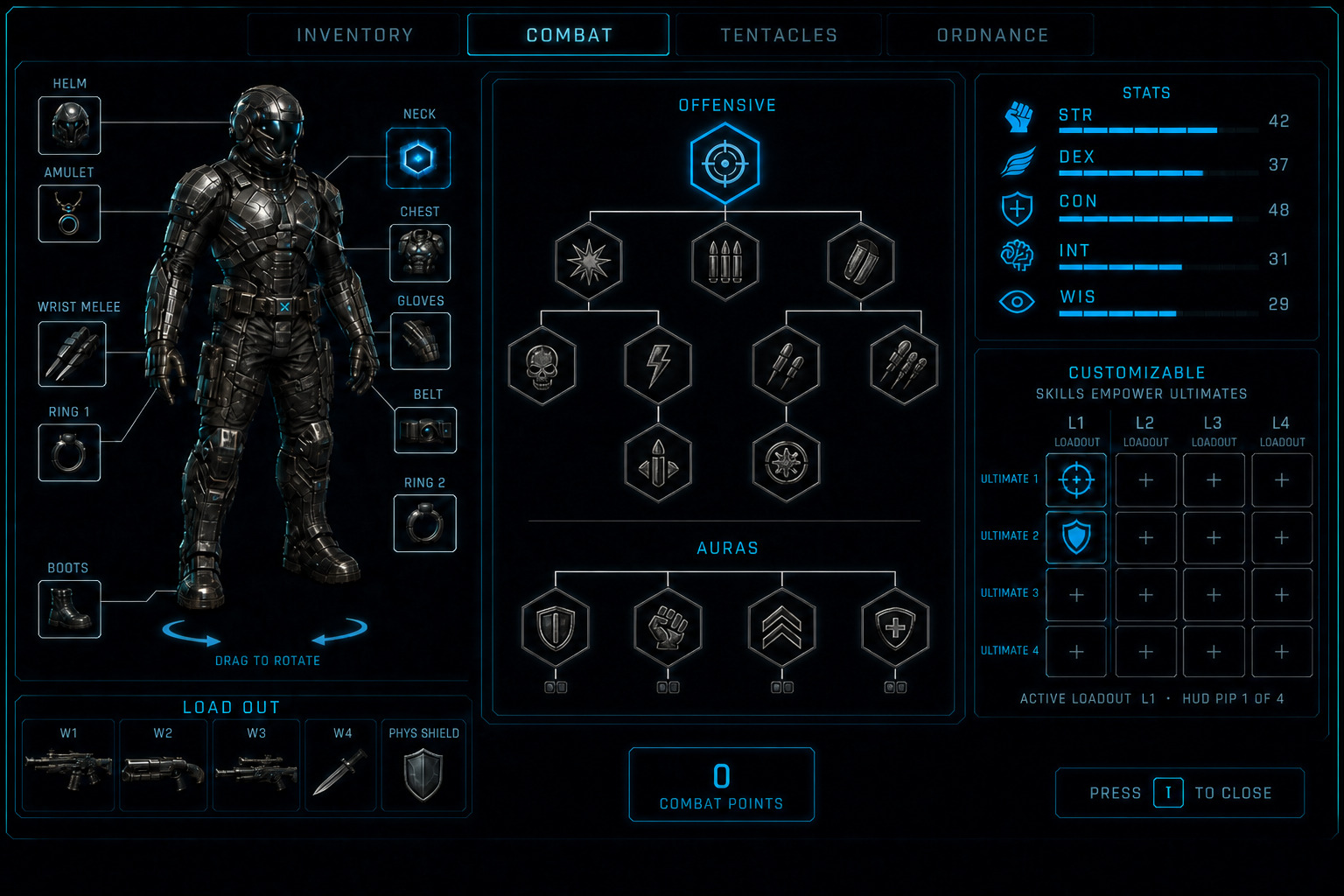
- Combat — class chips (Enforcer / Arcwarden / Phantom) then that class’s five subclass trees. Tap a chip to browse. Locked chips are preview-only; Unlock on the chip is the multiclass Commit (XP tax, new class starts at 1). Apex Invoke on Inspect is the other grant path (world-found Apex only; classes at highest class level). After Unlock or Invoke, tap sets Active. Class level + a hairline XP fill + five subclass pips sit on each owned chip. Character level stays on the STATS strip. The Combat tree has a scrollbar. Left-click empty tree space and drag to pan. Arrow keys pan. Mouse wheel zooms toward the cursor. Controller: left stick pans, LB zooms out, RB zooms in (L1 / R1). Combat points sit on this panel, not the visor. Left-click a skill spends one Combat point. Right-click refunds a spent point to the pool. Using a learned skill fills a use bar; a full bar grants a Combat point on that skill and does not spend the pool. Usage-granted points cannot be right-click refunded. Drag a learned skill into the Customizable dock only after it has at least one Combat point. Maximize is a single small icon the same size as the window X — a box with four outward arrows — in the upper right of the Combat panel. It is not the window X; the two controls never overlap. While maximized, that panel chip hides and Minimize (inward arrows) sits in the title bar left of the window X, same size, with a gap. The red X still closes Character I. Esc or Minimize restores docked Combat. Combat maximize expands the tree over the paper doll; stats and the Customizable dock stay so skills can still be dropped into the 4×4. Tentacles, Ordnance, Channels, and Inventory maximize keep the paper doll and LOAD OUT — the tree, bag, or channel list expands over stats and the dock. Inventory → Gear maximize is Forge filling everything except the doll and LOAD OUT (Gear bag hides until Minimize).
- Tentacles — Set 1→2→3 grouping. Each tentacle skill is already Offensive or Defensive; there is no Off / Def toggle. Drag a learned tentacle onto Upper / Mid / Lower. One tentacle per mount. Tentacle points sit on this panel, same rules as Combat: left-click spends, right-click refunds spent points. Using a learned skill that is mounted fills a use bar; a full bar grants a Tentacle point on that skill and does not spend the pool. Usage-granted points cannot be right-click refunded. Unmounted tentacles do not gain use ranks. Pre-gate shows Mechanical Arms for the mid mount only. The doll is a back view. Same scrollbar, empty-space drag pan, arrow-key pan, wheel zoom, and LB / RB zoom as Combat. Maximize keeps the back doll and LOAD OUT, like Inventory. Esc or Minimize restores.
- Ordnance — one shared grenade tree. Ordnance points sit on this panel, same spend / refund / Use rules as Combat. Learn many. Drag one learned grenade onto the doll hip socket; only one grenade is active at a time. Grenades cannot enter the dock. Same scrollbar, pan, and zoom as Combat. Maximize keeps the front doll and the grenade socket, like Inventory.
- Channels — scrollable center list (`W_TFA_I_Channels`). Not a skill tree: no pan, no wheel zoom — mouse wheel and scrollbar move the list. Block A Offense: Kinetic plus eight energy (Thermal, Cryo, Arc, Toxin, Isotopic, Fission, Plasma, Void) with glyph, name, and outgoing contribution. Block B Defense: same nine channels with resist % (post difficulty penalty, clamped to resist cap). Block C Core defenses: Shield / Armor / Health maxima, Energy Shield (Barrier) vs Phys Shield note, resist-cap reminder (default 75% + max-resist items). Exact outgoing-damage formula is data TBD. Maximize keeps the front doll and LOAD OUT; the list expands over stats and the dock. Esc or Minimize restores.
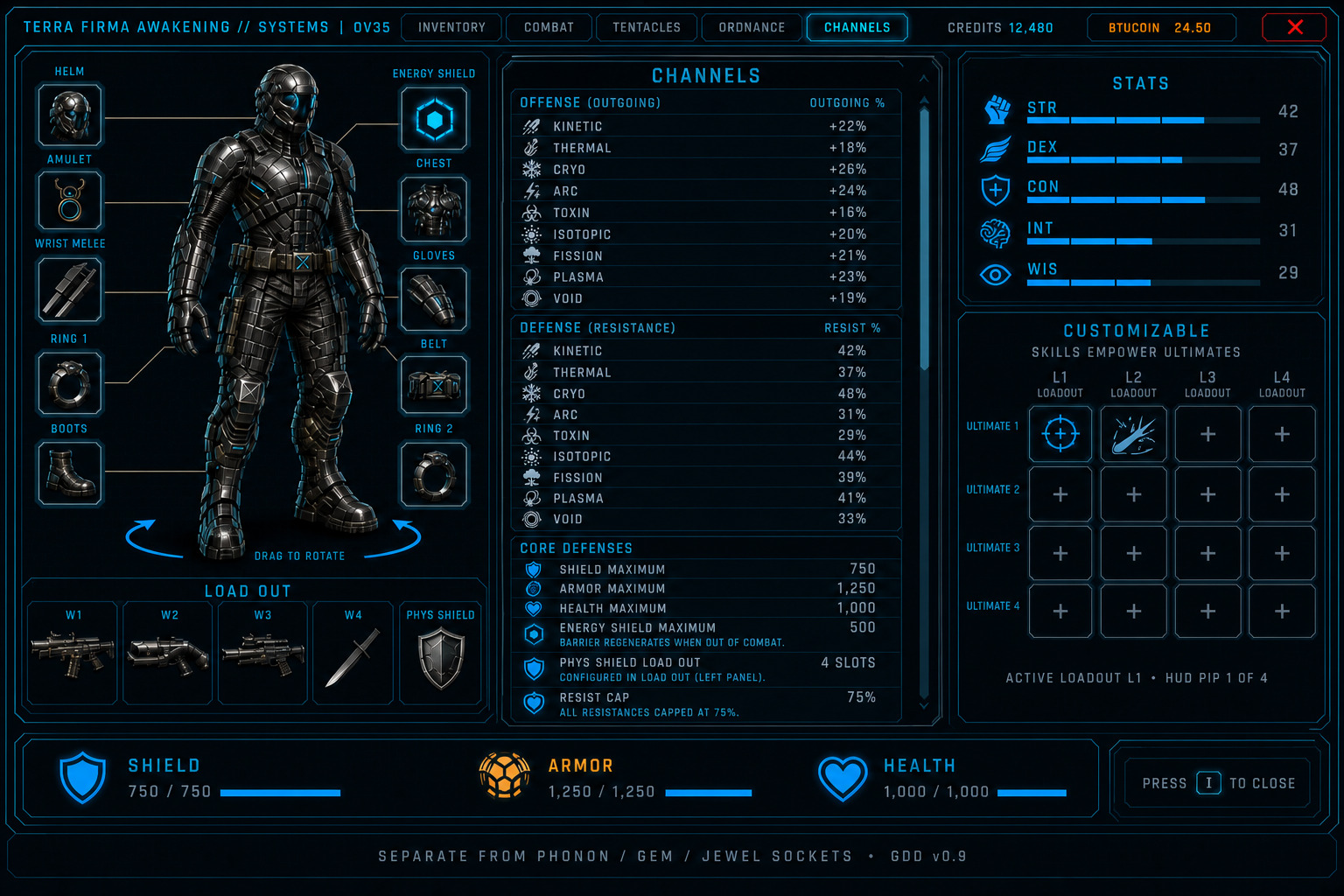
Figure OV35. Channels tab. Center panel scrolls through Offense (nine channels), Defense (nine resists), and Core defenses. Paper doll and LOAD OUT stay. Attribute strip and Customizable dock stay until maximize. Maximize keeps the doll; the list expands over stats and the dock.
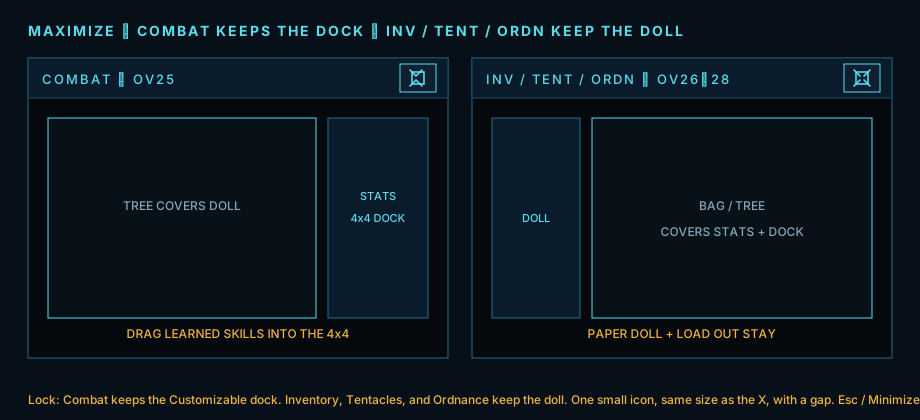
Lock plate. Combat maximize expands over the doll; stats and the Customizable 4×4 stay so skills can be dropped into the dock. Inventory / Tentacles / Ordnance / Channels maximize keep the paper doll and LOAD OUT. Gear maximize is Forge filling except doll and LOAD OUT. Minimize sits left of the window X, same size, with a gap — never overlapping the X or the wallet.
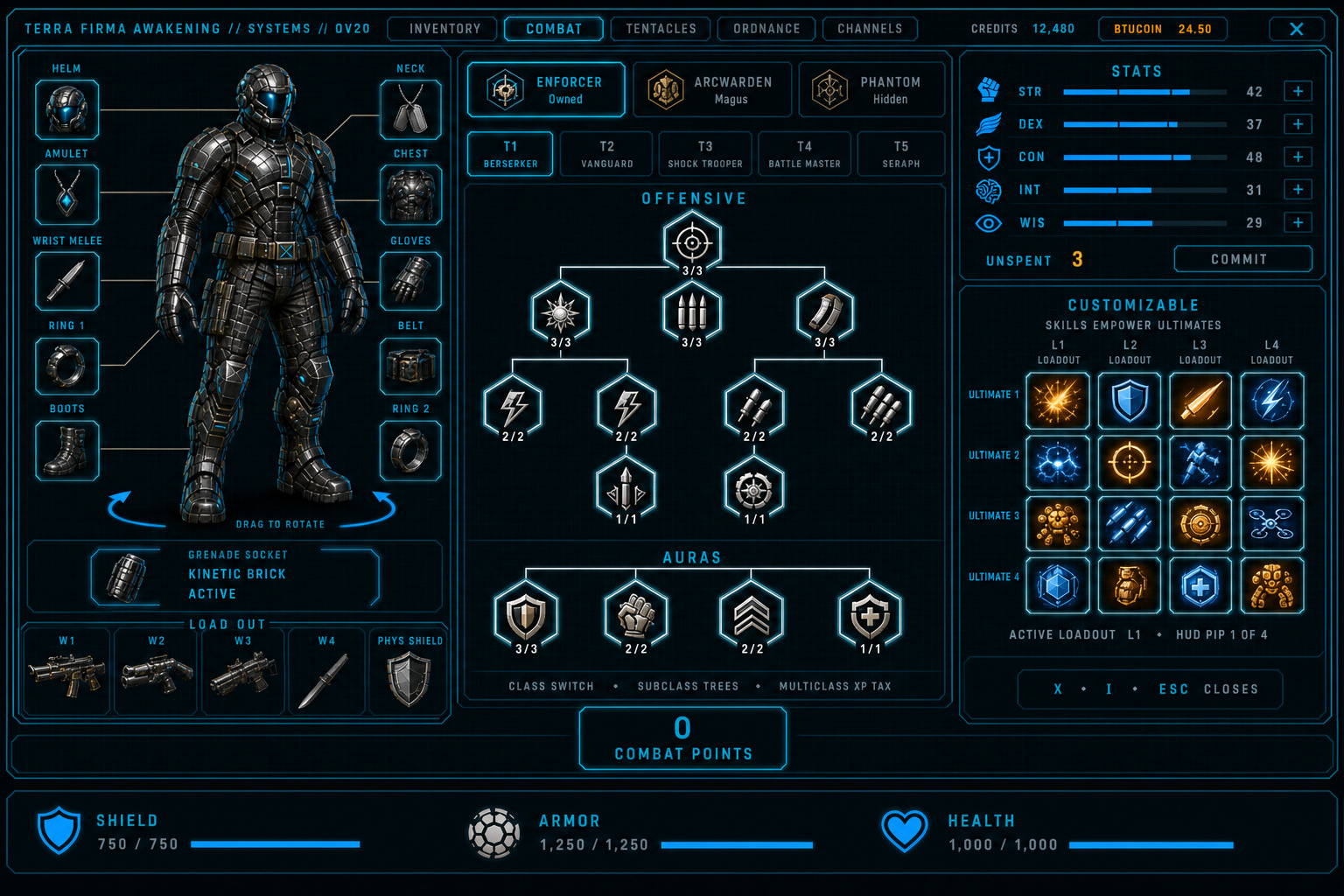
Figure OV20. Combat tab — class switcher, subclass trees (T1–T5), maximize icon on the tree panel. Doll, stats, and dock stay.
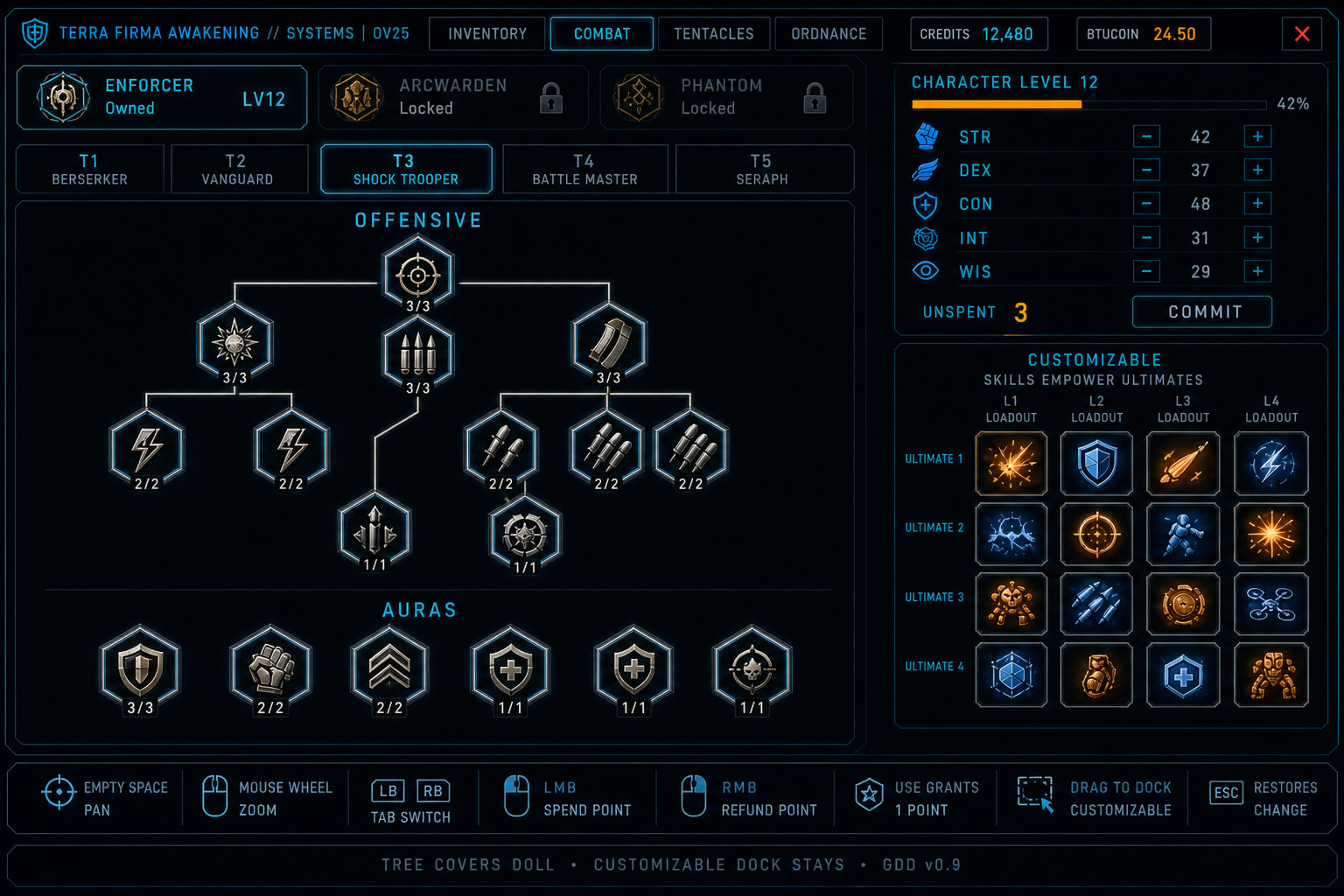
Figure OV25. Combat trees maximized. Tree expands over the paper doll. Stats and the Customizable dock stay — drag a learned skill into the 4×4. Minimize (inward arrows, left of the window X, same size, with a gap) or Esc restores docked Combat.
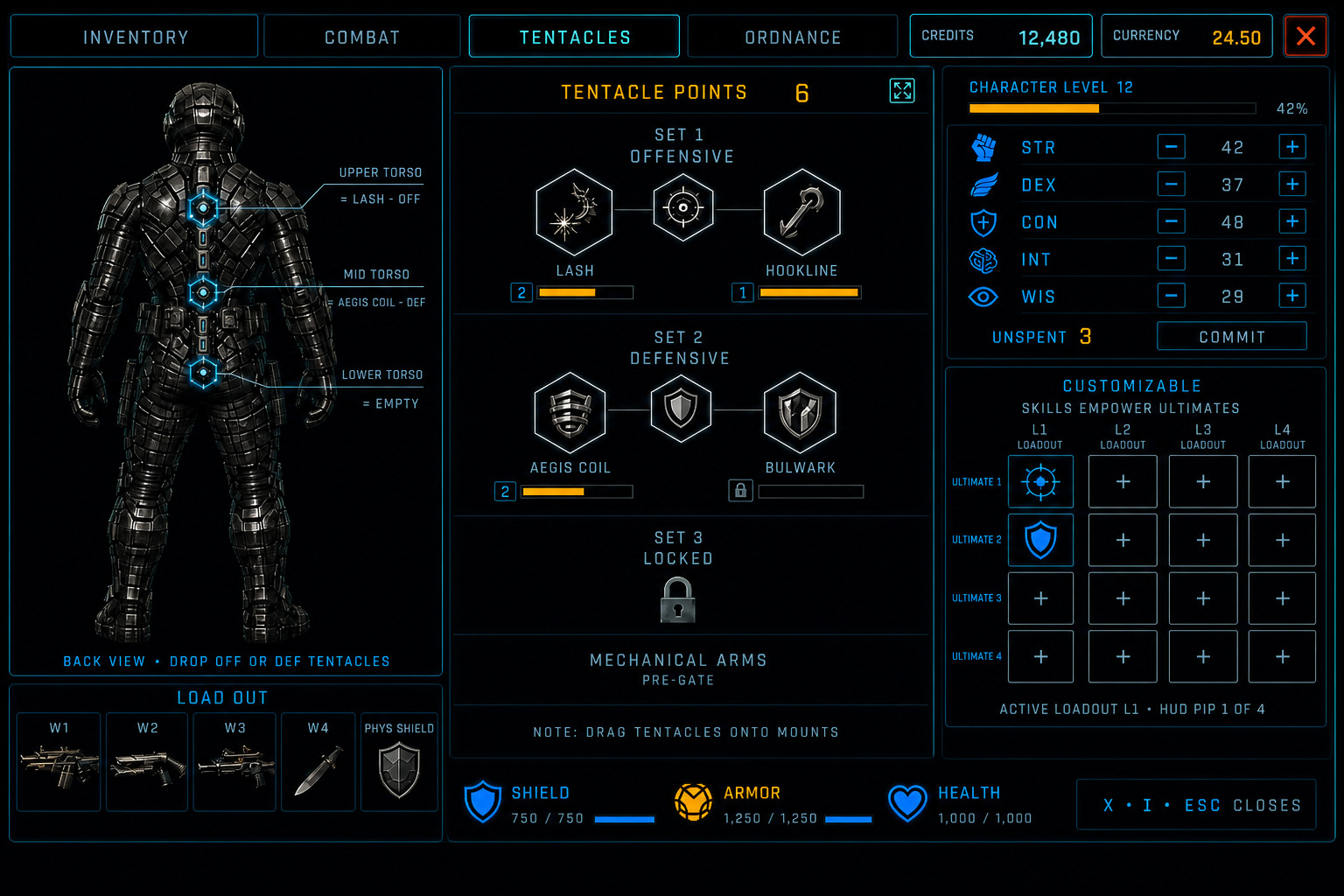
Figure OV21. Tentacles tab — back-view doll with Upper / Mid / Lower mounts. Drag a learned Off or Def tentacle onto a mount. Skills are already Offensive or Defensive — no toggle. Tentacle points on the panel. Dock stays.
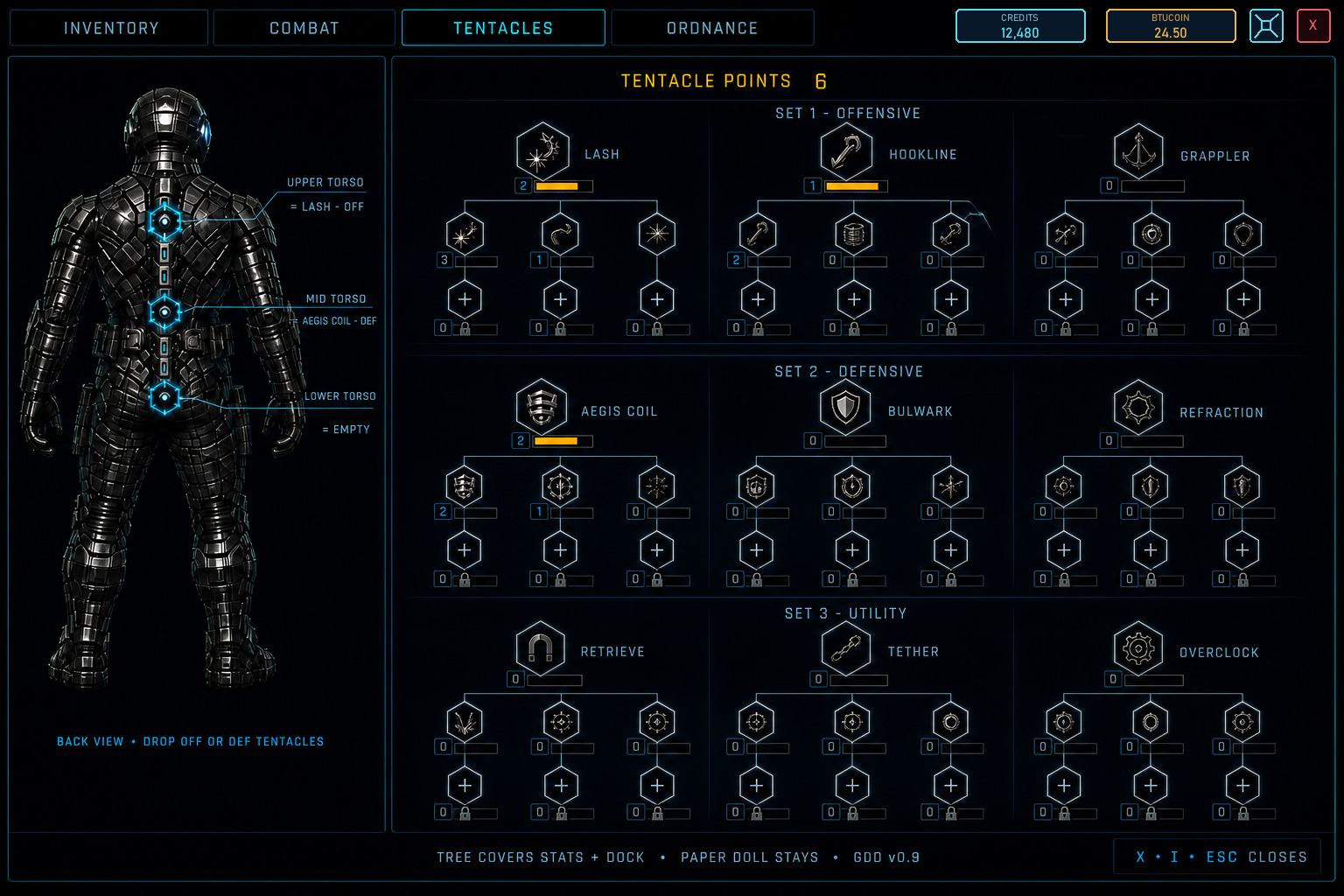
Figure OV27. Tentacles maximized. Tree expands over stats and the dock — the back doll and torso mounts stay, like Inventory. Minimize (inward arrows, left of the window X, same size, with a gap) or Esc restores docked Tentacles.
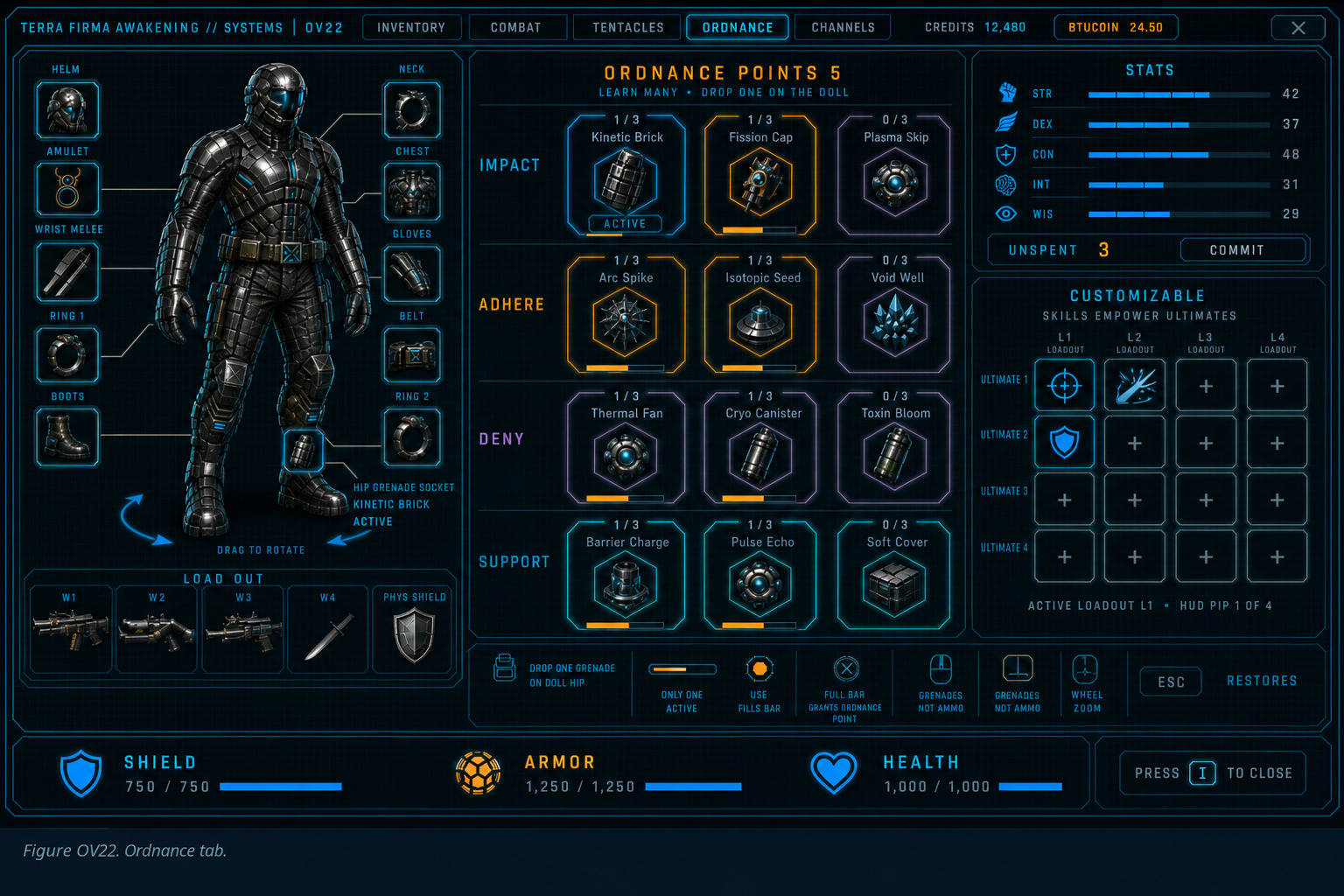
Figure OV22. Ordnance tab — Ordnance points on the panel. Families Impact / Adhere / Deny / Support. Drag a learned grenade onto the doll hip socket. Only one grenade is active. Grenades stay out of the dock.
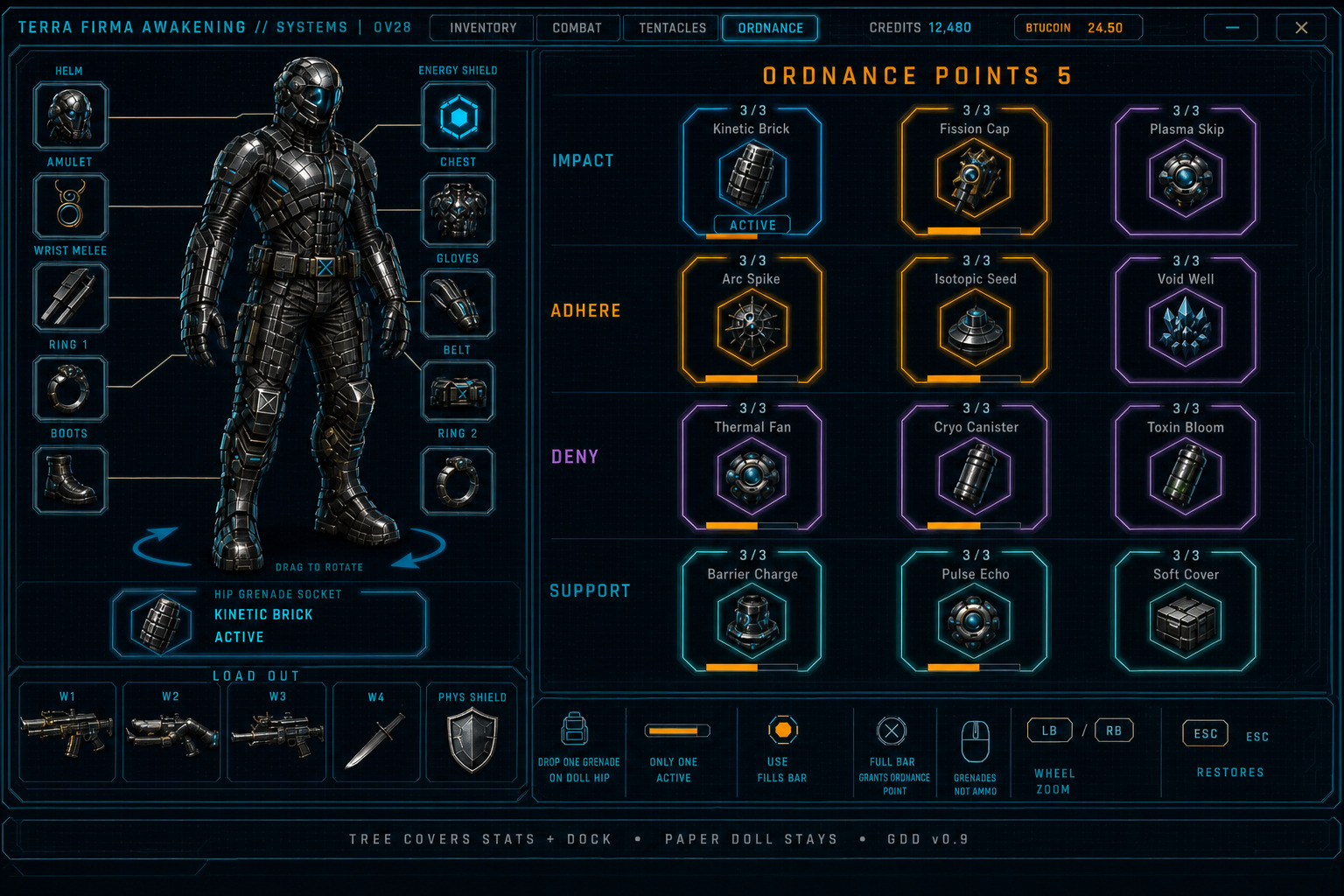
Figure OV28. Ordnance maximized. Tree expands over stats and the dock — the front doll and grenade socket stay, like Inventory. Minimize (inward arrows, left of the window X, same size, with a gap) or Esc restores docked Ordnance. Only one grenade is active.
Ultimate 1–4 are seats. Named Ultimate skills per Order / subclass are still TBD. STR / DEX / CON / INT / WIS on this screen are a working list — Energy stays a pool.
In-game GUIs — Character screen I
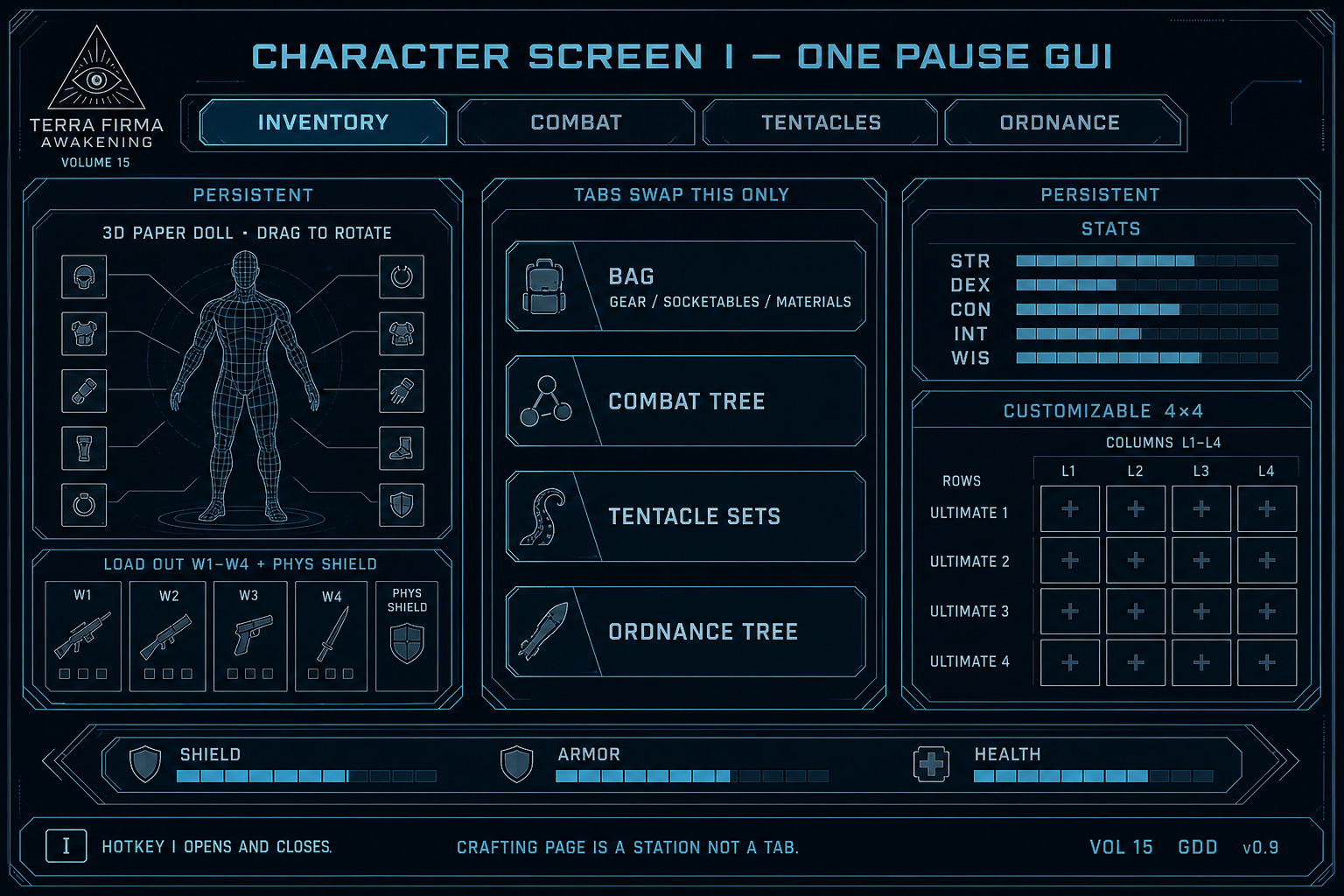
Section titled “In-game GUIs — Character screen I”Hotkey I opens and closes one pause screen. Five top tabs: Inventory, Combat, Tentacles, Ordnance, Channels. Tabs swap only the center panel. The 3D paper doll, LOAD OUT, stats, Customizable dock, and Shield / Armor / Health stay put. The Crafting Page is Inventory → Gear maximize split. Hubs and field fabricators keep a station bonus.
- Play HUD stays the visor. I is not a second HUD.
- No Map / Quests / social tabs on I.
- The paper doll is a 3D figure. Drag to rotate.
Inventory bag + item sockets
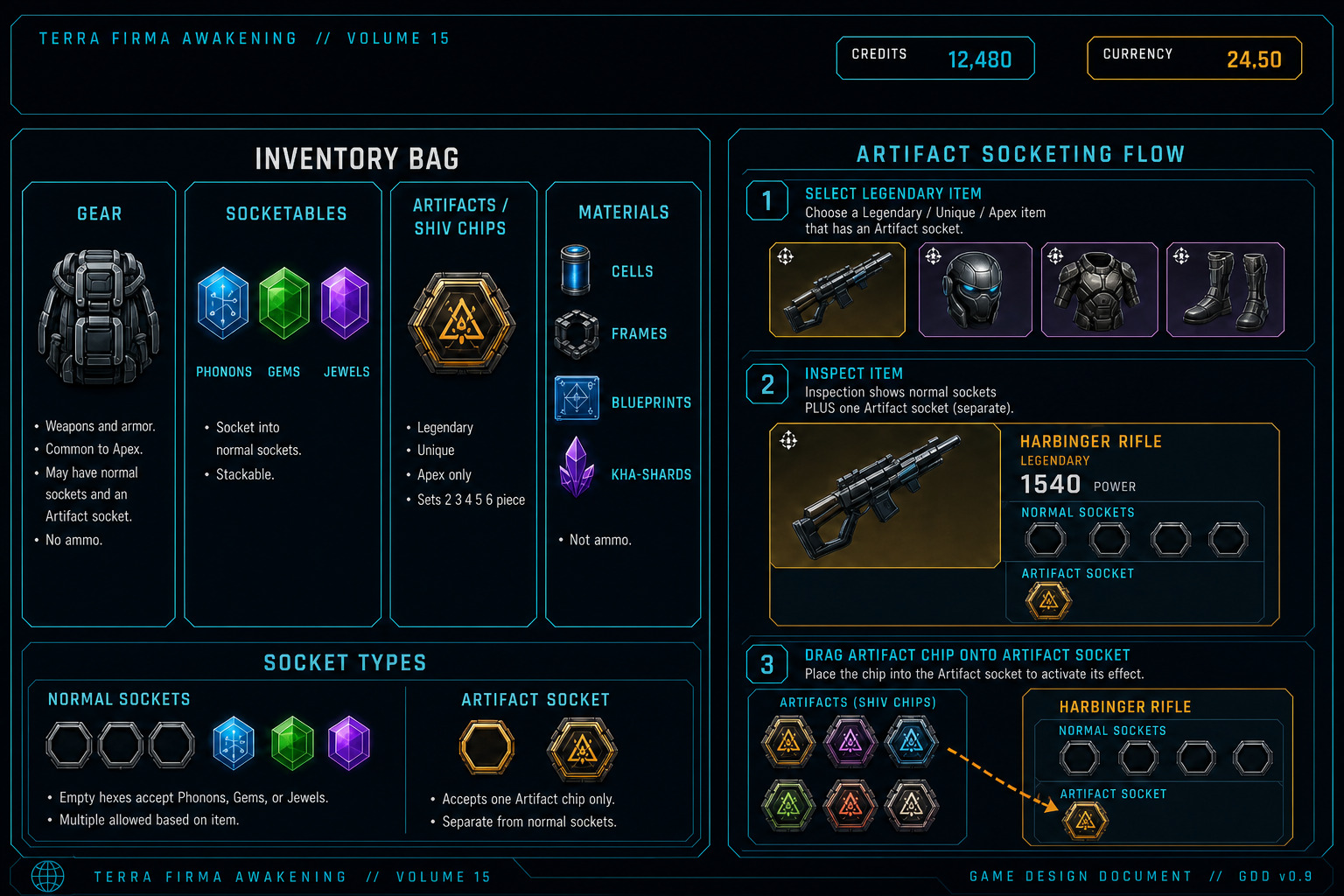
Section titled “Inventory bag + item sockets”Inside the Inventory tab, three inner tabs: Gear · Socketables · Artifacts. Phonons, Gems, and Jewels share Socketables. Artifacts / Sets are a separate bag page. Crafting is the Crafting Page. There is no Materials bag. Right-click a gear item to open Inspect (weapon or armor page).
- GEAR — guns, armor, ammo. Right-click opens Inspect.
- SOCKETABLES — Phonons, Gems, and Jewels on one page (vol. 08 trinity). Fill normal sockets.
- ARTIFACTS — Shiv interface chips. Socket only into Unique / Apex. Legendary never has an Artifact socket. One Artifact per item. Artifact socket is separate from Phonon / Gem / Jewel sockets. Sets are Unique (and Apex) item pieces: Set ID + piece index on the Unique / Apex. Legendary never carries a Set ID. Legendary has no Artifact socket. Worn SetIDs unlimited; Active Sets under ASBP=6 (FS-ITM-004). Thresholds 2 / 3 / 4 / 5 / 6-piece per active Set.
- CRAFTING — Inventory → Gear workbench after maximize. Reagents, unlock keys, Forge, and Refit. No Materials bag.
- Inspect: up to 6 Phonon / Gem / Jewel sockets (hard cap; actual count gated by base type + item level). Empty sockets still draw. Legendary / Unique / Apex also show one Artifact socket.
- Common / Uncommon / Augmented / Rare cannot host Artifacts.
- Dismantle / break down is on Inspect. Preview the yield first. Weapons return a Weapon Frame plus mats. Armor returns an Armor Blueprint plus mats. The item is destroyed.
- Socketed Phonons, Gems, Jewels, and Artifact are never lost. They return to the bag on dismantle.
- Socketing / unsocketing Artifacts also uses Crafting Page rules (material cost TBD).
Combat / Tentacles / Ordnance tabs
Section titled “Combat / Tentacles / Ordnance tabs”These three tabs keep the same doll, LOAD OUT, stats, and Customizable dock. Only the center panel changes so skills can be dragged into the dock without leaving I.
- Combat — Offensive and Aura tree. Drag learned Combat skills into the dock.
- Tentacles — Set 1→2→3 (Off or Def per set). Pre-gate shows Mechanical Arms in the center only.
- Ordnance — one shared grenade tree. Learn many, equip one. Grenades cannot enter the dock.
Ultimate 1–4 are seats. Named Ultimate skills per Order / subclass are still TBD. STR / DEX / CON / INT / WIS on this screen are a working list — Energy stays a pool.
Secure Locker — hub account storage
Section titled “Secure Locker — hub account storage”SECURE LOCKER (W_TFA_SecureLocker) is account overflow storage for unused equipment. Open it only at a hub / station terminal. It is not a Character I top tab, not the Armory foundry (discovered spines), and not Online coop Vault. Contract: FS-GUI-009 · tab SKU FS-ECO-014.
Dual-pane: left = CHARACTER GEAR (Gear · Socketables · Artifacts, bag 10×6); right = SECURE LOCKER for the selected tab (12×12). Center transfer rail: DEPOSIT → / ← WITHDRAW. Title bar shows Account + realm chip + LUMENAR (Buy Tab) — not CREDITS / BTUCOIN I-bar chips. Six free tabs (rename + symbol). More tabs cost LUMENAR (secure_locker_tab_slot). Occupancy reads tab used / 144.
- Deposit: select bag tile → DEPOSIT →; or drag bag → Locker (or onto a tab chip); right-click / double-click deposits to the active tab when space allows.
- Withdraw: select Locker tile → ← WITHDRAW; or reverse drag / double-click / right-click. Refuse if Gear lacks a free footprint rect. Equipped seats must unequip to bag first.
- Armor footprints are large multi-cell too — chest 2×3, helm/gloves/boots 2×2 — not weapons-only multi-cell.
- Search: name, type, quality, slot, sort; scope Current tab or All tabs (tab badge + jump). Search never moves items.
- Account-bound per realm (Solo local · Online EOS PUID). Shared across that realm’s characters. Deposit / withdraw does not flip
InvokeEligible. - Online: server fail-closed outside hub, in combat, or downed.
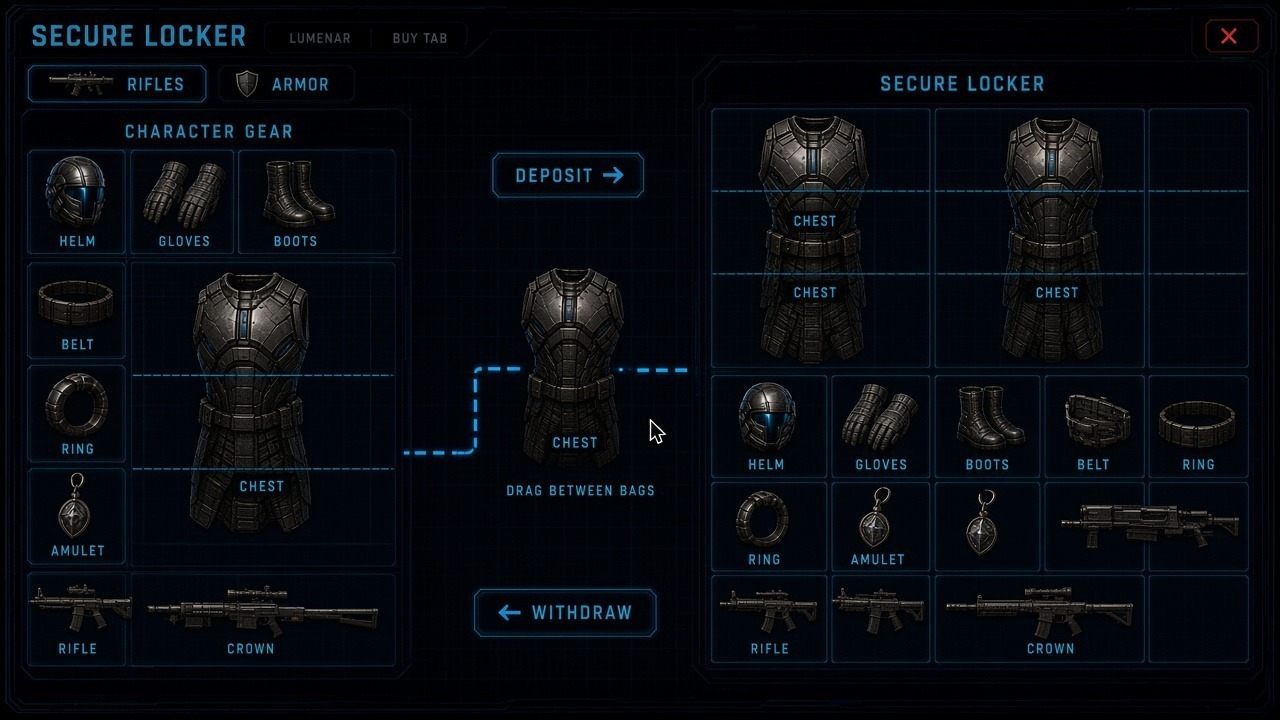
Figure — Secure Locker. CHARACTER GEAR left · DEPOSIT / WITHDRAW rail · vault right · chest 2×3. FS-GUI-009.
Walk the lab: UX · Secure Locker.
Rectangular bag footprints
Section titled “Rectangular bag footprints”FS-GUI-010 / FS-GUI-009. Multi-cell rectangular Gear footprints — not uniform 1×1 slots. Character I Gear is 10×6 (60). Secure Locker tabs 12×12 (144), same cell size. Catalog: tfa_item_footprints_v2.json. No L / T shapes. 90° rotate. No currency / ammo in bags. Socketables / Artifacts stay 1×1. Refit modules = Gear 1×1; Crafting reagents = Forge rail only; parts strip = bag view.
- Guns by Class×Receiver (e.g. Sidearm 2×1 · Rifle Auto/Trace 3×1 · Shotgun 3×2 · Bow 2×4 · Heavy/Rocket/Crown 4×2).
- Armor: helm/gloves/boots 2×2 · chest 2×3 · belt 2×1 · ring/amulet/module 1×1.
- Melee: wrist/dirk 1×2 · 1H 1×3 · staff 1×4 · 2H sword 2×3 · polearm 2×4.
- Locker tabs: rename + symbol + accent. Forge / deposit need a free rectangle.
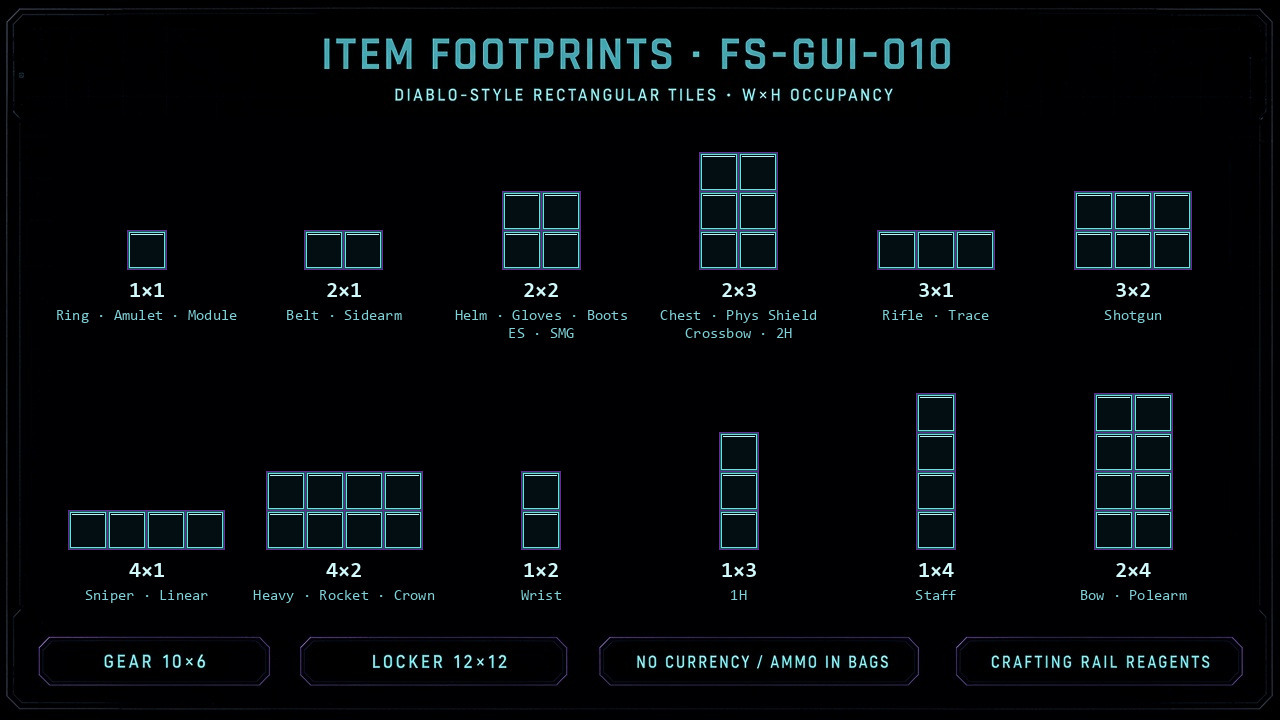
Figure — Item footprints matrix (Class×Receiver · armor · melee · modules). FS-GUI-010 v2.
Figure — Mixed W×H tiles · modules 1×1 on Gear · FS-GUI-010 v2.