Weapon Loadout — 4 Weapon Slots + Wrist Melee + Physical Shield, Stance Cycles & Hotkeys
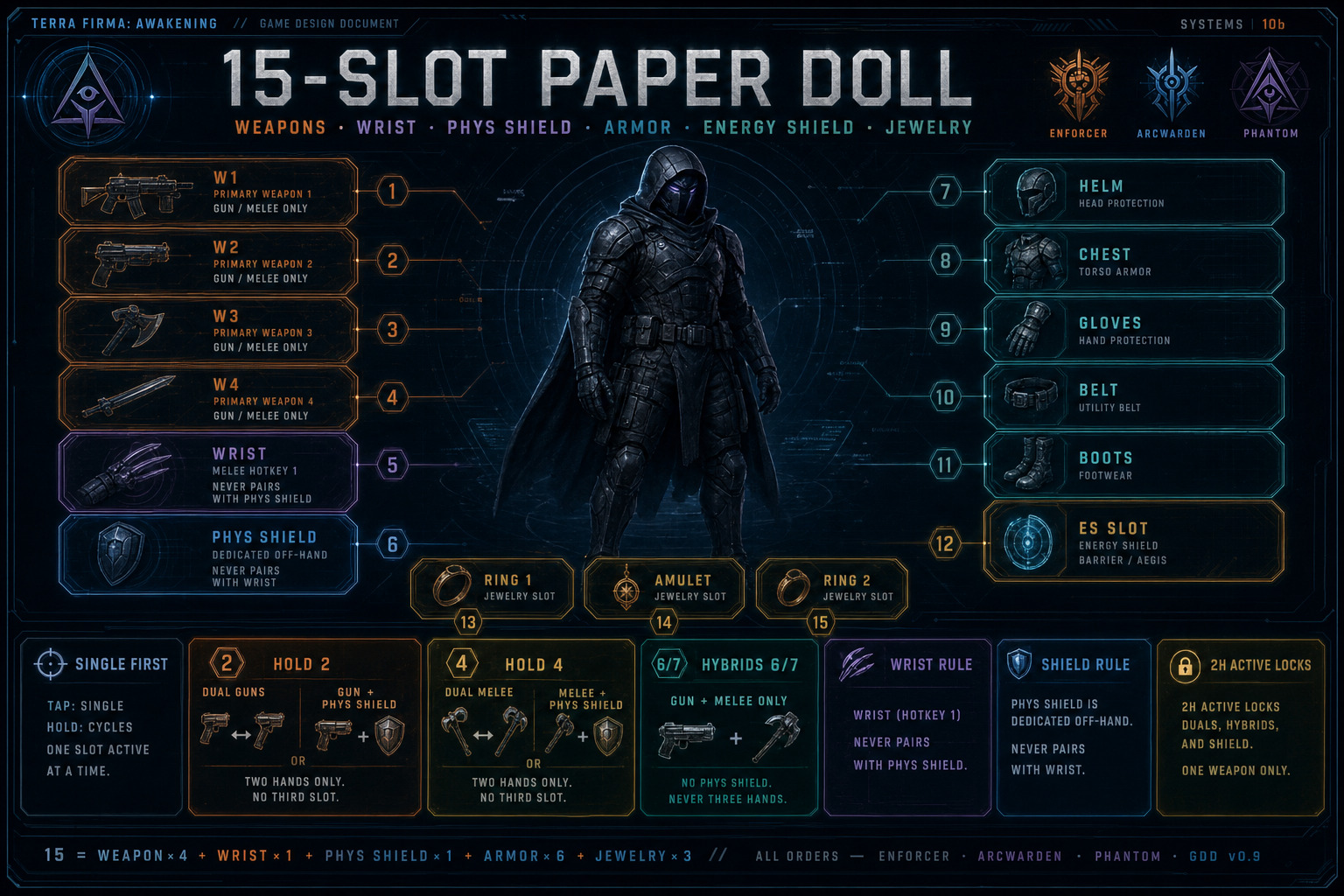
The paper doll carries four weapon slots, one equipable Wrist Melee slot, and one dedicated Physical Shield slot (Catalog name Physical Shield = HUD/FS short form Phys Shield.). Weapon slots accept guns and melee only — Physical Shields no longer occupy Weapon 1–4. The Wrist Melee slot accepts only Wrist Razors / Blades family bases; hotkey 1 draws this slot. Default combat stance is always single-wield; dual-weapon and weapon+shield stances are opt-in via hold cycles. Keys 6 and 7 form gun+melee hybrid duals. The paper-doll Energy Shield slot remains separate Barrier / Aegis gear — always on — and is not a physical board.
Weapon Slots + Wrist Melee + Physical Shield
- Weapon 1 / Weapon 2 / Weapon 3 / Weapon 4 — guns and melee only (1H or 2H). No Physical Shield bases in these slots.
- Wrist Melee (Melee — Wrist Razors) — dedicated equipable melee slot; accepts Wrist Razors / Blades melee family bases only; hotkey 1 draws this slot.
- Physical Shield — dedicated paper-doll off-hand slot (buckler / ballistic / riot / tower fantasy). Not a hotkey alone; never a raise-only combat stance.
- No family is locked to a specific Weapon 1–4 slot number.
- Physical Shields do not go in the Energy Shield paper-doll slot.
- Wrist Melee does not pair with Physical Shields. Energy Shield slot remains always-on while using Wrist Razors.
- Only slotted weapons / Physical Shield / Wrist Melee are available in combat; inventory pieces must be assigned first.
- All four weapon slots + Wrist Melee + Physical Shield can feed matching active Sets under ASBP when those Unique / Apex items match. Legendary never.
Loadout Assignments
- Wrist Melee — equipable melee slot for Wrist Razors/Blades; hotkey 1.
- Primary gun / Secondary gun — shooting loadout picks used by keys 2 and 3.
- Primary melee / Secondary melee — melee loadout picks used by keys 4 and 5.
- Physical Shield — dedicated off-hand slot; pairs via Hold 2 / Hold 4 cycles when filled.
- Assignments are player-configured — not hard-locked to any single Weapon 1–4 slot index.
Default Stance — Always Single First
- Drawing a 1H gun or 1H melee always starts in single-wield of that weapon.
- Tap 2 / 3 / 4 / 5 selects that assignment and resets that family to single-wield.
- Mouse wheel stays inside the current stance mode (see Mouse Wheel).
Gun Family — Hold 2 Cycle
- Start: single primary or secondary gun (tap 2 or 3).
- Hold 2 → Dual guns (primary + secondary 1H firearms).
- Hold 2 again → Gun + Physical Shield (active 1H gun + Phys Shield slot).
- Hold 2 again → returns to Dual guns; Tap 2 or 3 → returns to single of that gun.
- If the Physical Shield slot is empty, the gun+shield step is skipped (Single ↔ Dual only).
- If only one valid 1H gun is equipped, the dual-guns step is a no-op / skip.
- Active gun when entering gun+shield: last single-drawn 1H gun; else primary (2). Wheel swaps which gun is paired.
- While dual-wielding two guns: ADS is disabled; reload is much slower (tunable penalty).
- While gun + Physical Shield: ADS is HARD LOCKED off (cannot aim down sights with a shield in-hand); block / bash / guard verbs on the shield.
Melee Family — Hold 4 Cycle
- Start: single primary or secondary melee (tap 4 or 5).
- Hold 4 → Dual melee (primary + secondary 1H melee).
- Hold 4 again → Melee + Physical Shield.
- Hold 4 again → returns to Dual melee; Tap 4 or 5 → returns to single of that melee.
- If the Physical Shield slot is empty, the melee+shield step is skipped.
- If only one valid 1H melee is equipped, the dual-melee step is a no-op / skip.
- Active melee when entering melee+shield: last single-drawn 1H melee; else primary (4). Wheel swaps which melee is paired.
- Melee + Physical Shield: block / bash / guard verbs; Energy Shield slot remains active.
Hybrid Gun + Melee — Keys 6 / 7
- Tap 6 — Primary gun + Primary melee.
- Hold 6 — Primary gun + Secondary melee.
- Tap 7 — Secondary gun + Primary melee.
- Hold 7 — Secondary gun + Secondary melee.
- Requires both pieces valid 1H; otherwise no-op.
- Hybrid stances are dual-weapon stances: no ADS; slower reload when a gun is in the pair.
- Physical Shield is not in-hand during hybrid duals (stowed; still equipped in its slot).
- Mouse wheel in hybrid mode cycles among the four gun×melee hybrids.
Mouse Wheel
- Single gun mode — cycles primary ↔ secondary gun.
- Gun + Physical Shield — cycles which 1H gun is paired with the shield.
- Single melee mode — cycles primary ↔ secondary melee.
- Melee + Physical Shield — cycles which 1H melee is paired with the shield.
- Dual guns / dual melee — wheel no-op (only one pair).
- Hybrid 6/7 mode — cycles the four gun×melee combinations.
Two-Handed Weapons — Lockouts
- While a 2H gun or 2H melee is the active drawn weapon: dual-gun, dual-melee, hybrid 6/7, and weapon+shield options are unavailable.
- While a 2H weapon is active, the Physical Shield slot is locked (cannot pair; shield stows / cannot enter shield stances).
- A stowed 2H in another Weapon 1–4 slot does not lock 1H draws or the shield slot.
- Tap the 2H assignment key = two-hand stance only.
Physical Shield Rules
- HARD LOCK: Wrist Melee + Physical Shield — never.
- HARD LOCK: Physical Shield alone — no combat stance.
- HARD LOCK: Dual guns + shield, dual melee + shield, gun + melee + shield — impossible (three hands).
- Valid: 1H gun + Physical Shield; 1H melee + Physical Shield.
- Invalid with shield: 2H weapon (while active); Wrist Melee.
- While the shield is not in the active pair, it stays in its paper-doll slot but is not in-hand (no block/bash until paired again).
Physical Shield = dedicated combat off-hand board slot. Energy Shield slot = always-on Barrier / Aegis module. Different systems.
Energy Shield Slot — Barrier / Aegis (Sci-Fi)
- Energy Shield is a dedicated paper-doll slot (Armor group). UI label: Energy Shield (Barrier) — not “Physical Shield.”
- Fiction: projector plate / barrier coil / field lattice — apex-tech Energy Shield gear.
- Accepts only Energy Shield / Barrier / Aegis gear — never Physical Shields.
- Equipped piece influences the character’s Energy Shield: capacity, recharge, % damage shift to Energy, and related ES packages (exact bands TBD).
- The Energy Shield slot stays equipped and its influence remains active in every stance (single, dual, weapon+Phys Shield, hybrid, 2H).
Energy Shield combat pipeline still applies (see damage/resist volumes). ES bases use Barrier / Aegis / Screen fantasy naming in Rare/Augmented pools.
Keyboard Hotkeys — 1 through 7
- 1 — Wrist Melee (equipable melee slot) — Wrist Razors / Blades only; does not pair with Physical Shields.
- 2 — Primary gun, solo (tap). Resets gun family to single.
- Hold 2 — Advances gun family cycle: Dual guns ↔ Gun + Physical Shield (skips shield step if Phys Shield empty; dual no-op if only one 1H gun).
- 3 — Secondary gun, solo (tap). Resets gun family to single.
- 4 — Primary melee, solo (tap). Resets melee family to single.
- Hold 4 — Advances melee family cycle: Dual melee ↔ Melee + Physical Shield (skips shield step if Phys Shield empty; dual no-op if only one 1H melee).
- 5 — Secondary melee, solo (tap). Resets melee family to single.
- 6 — Tap: primary gun + primary melee. Hold: primary gun + secondary melee.
- 7 — Tap: secondary gun + primary melee. Hold: secondary gun + secondary melee.
Hold threshold 200 ms (
UTFAInputConfig; Mod-tunable — closes TBD-006). Pad scheme provisional FS-INP-005: LB ability radial · RB tap reload / hold stance wheel · Y grenade · R3 tentacles · D-pad Up Vision · D-pad Down Interact. Mouse wheel = singles loop (includes Wrist); Dual / Phys Shield stay Hold 2 / Hold 4 — not on the mega-wheel. Authority: Programming Bibledocs/08.
Stance Summary
- Solo firearm (tap 2 or 3) — ADS allowed; Energy Shield active; Phys Shield not in-hand.
- Wrist Melee (key 1) — razor/blade verbs; Energy Shield active; no Phys Shield pair.
- Solo melee (tap 4 or 5) — Energy Shield active; Phys Shield not in-hand.
- Dual guns (Hold 2) — no ADS; slower reload; Energy Shield active.
- Gun + Physical Shield (Hold 2 cycle) — no ADS (HARD LOCK); block/bash; Energy Shield active.
- Dual melee (Hold 4) — Energy Shield active.
- Melee + Physical Shield (Hold 4 cycle) — block/bash; Energy Shield active.
- Hybrid gun+melee (6 / 7) — no ADS; Energy Shield active; Phys Shield stowed.
- Solo Heavy Gun / 2H melee — ADS follows that weapon; dual/hybrid/shield locked; Phys Shield slot locked while active; Energy Shield remains active.
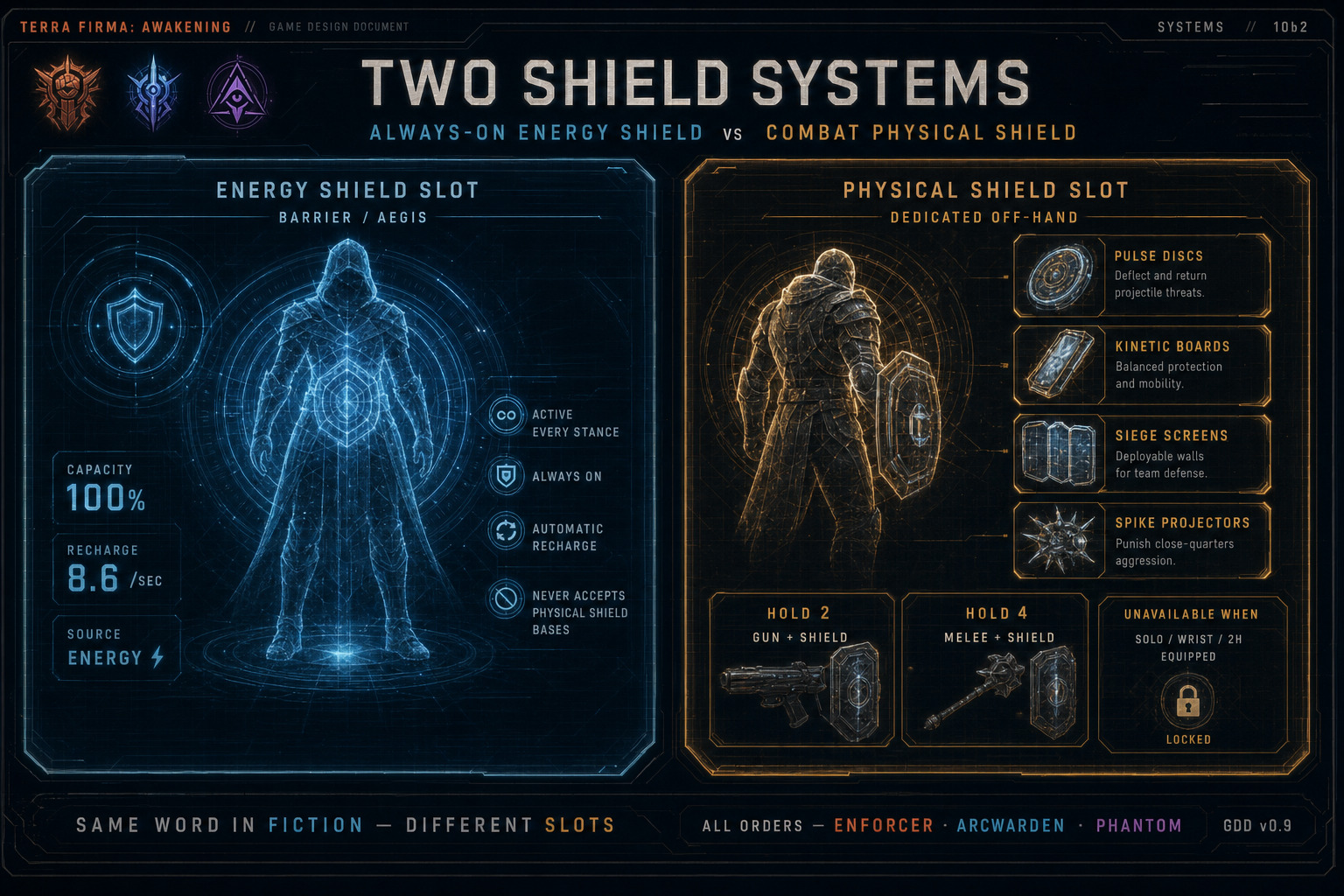
Figure — Energy Shield slot: Barrier / Aegis gear only (always on). Physical Shields use the dedicated Phys Shield paper-doll slot; pair with 1H gun or 1H melee via Hold 2 / Hold 4 cycles.
Character Movement
Section titled “Character Movement”Demo + Full + Cinematic Benchmark Motion Matching: Pose Search drives baseline loco (start/stop/pivot). Demo keeps Lyra upper/lower Linked Layers —
docs/tutorials/demo-motion-matching-lyra.md. Mesh MM never owns camera / Look. Spec:docs/superpowers/specs/2026-11-02-motion-matching-full-design.md.
Baseline locomotion for every operative in FPP and TPP. Same verbs across Story, Progressive Multiplayer, and Ladder. Affixes/skills may enhance distance, cooldown, or stamina cost — they do not gate these moves. Engineering authority: FS-INP-001 · FS-MOV-001–005. Demo lock: bible docs/22-demo.md § Wall Run · opposite dash · Vault WILL NOT USE.
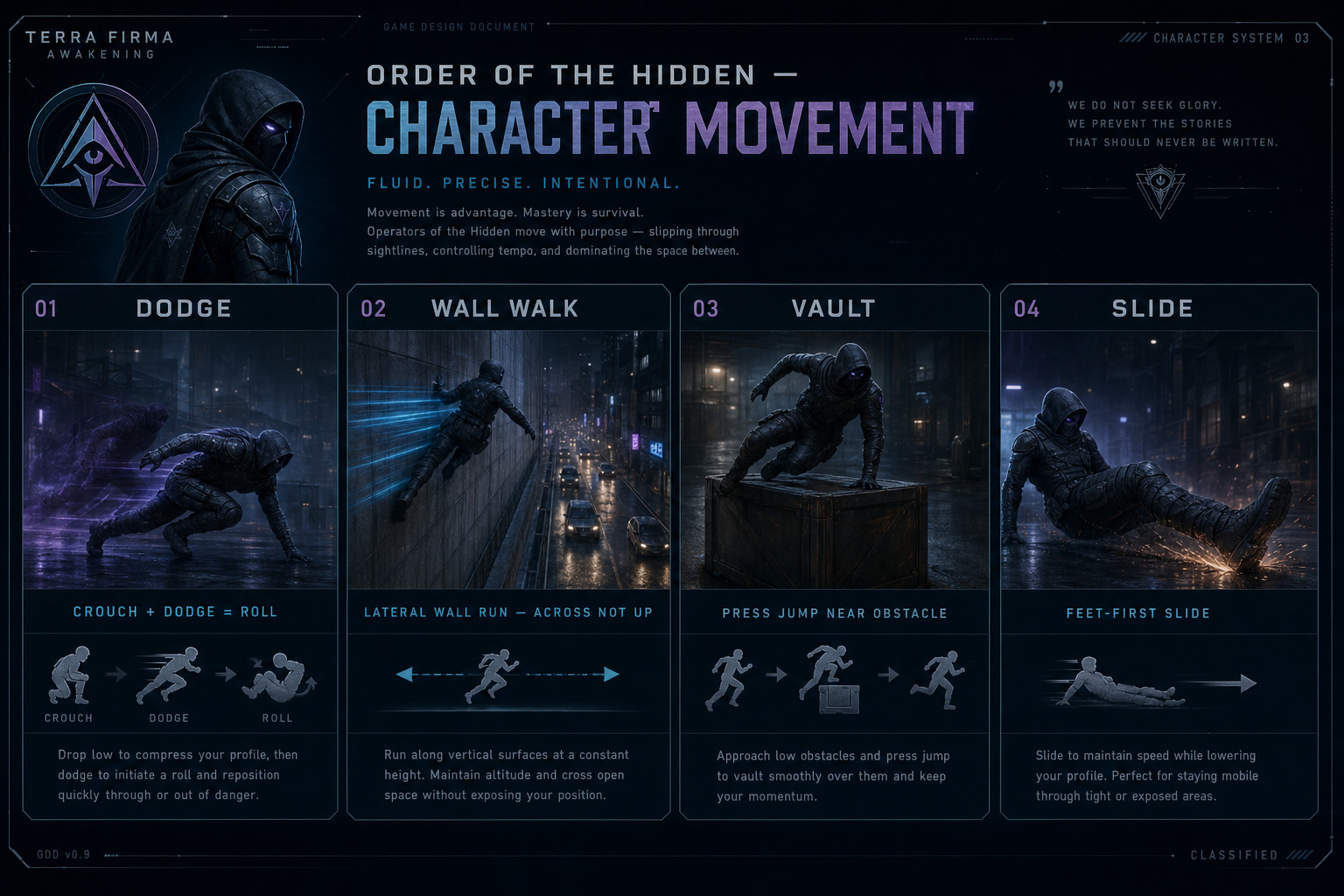
Figure — Dodge / Roll (double-tap; crouch+dodge = roll); Wall Run (Space enter, continues without hold); WILL NOT USE Vault (was Space near tagged ledge — FS-MOV-003); Slide feet-first (sprint + Crouch); opposite-wall double-tap dash while Wall Running.
Look vs move vs body
- Look = mouse / Right Stick only. Camera never flips from mesh anims.
- Move = WASD / Left Stick. Jump flip, vault, wall-run, and dodge montages rotate the mesh only — they never own the camera.
Double-Tap Dodge / Roll
- Double-tap the Forward, Back, Left, or Right movement input to Dodge in that direction.
- Keyboard: double-tap W / S / A / D.
- Controller: double-tap D-pad direction, or a quick double-flick of the Left Stick in that cardinal direction within the dodge timing window.
- Default Dodge is a short i-frame / displacement burst used for spacing, baiting, and breaking aim — not a long teleport. Roll variant: hold / press Crouch while activating Dodge (crouch + double-tap move). Same i-frame / recovery window as Dodge; different animation (combat roll), slightly different profile / cancel feel, and lower silhouette during the move. If Crouch is pressed without a Dodge activation while at sprint speed, that is feet-first Slide — not Roll. Roll only happens when Crouch is combined with Dodge.
- While Wall Running: double-tap toward the opposite side is wall-to-wall dash (FS-MOV-004), not ground Dodge. Same-side double-tap does not transfer. On ground, double-tap remains Dodge.
- Works in both FPP and TPP. Direction is world/camera-relative to the pressed axis.
- Cannot chain infinitely — recovery frames and optional stamina/Energy cost TBD.
Wall Run (was Wall Walk)
- Enter (all mandatory): sprint speed · Space / Cross / A · contact / legal proximity with a tagged wall (
TFA.World.WallRunnable; migrate/aliasWallWalkable). - Same physical key as Jump — context wins (no Vault). Sprinting into a wall without Space does nothing (no accidental stick).
- Persist: Wall Run continues while valid wall contact — not a hold-to-stick. Releasing Space does not cancel. Ends on leave surface / fail / timeout (
WallRunMaxDurationlab default 3.0 s; DEX/affix scale) / wall jump-off / auto peel (lookahead miss or turn gate). Lookahead lab default 2.0 m · 4 samples;MaxWallTurnDegreeslab default 45° — under gate = curve follow (re-stick normal, no timer reset); over gate or wall end = auto peel (same exit as wall jump-off). Wall-to-wall dash success continues Wall Run and resets the timer — it does not end the run. Authority: FS-MOV-004 ·docs/superpowers/specs/2026-11-02-wall-run-curve-end-design.md. Move / camera while stuck: W is wall-locked along the wall tangent (not camera-yaw relative like ground). Look stays free and does not steer the run; no soft camera assist. Perspective still follows stance (gun FPP / melee TPP — FS-CAM-001). Spec:docs/superpowers/specs/2026-11-02-wall-run-camera-move-design.md. - Lateral wall run along the surface (parallel to the ground) — not a straight climb. Jumping off preserves momentum for jump-kicks, repositions, and FPP peeks.
- Opposite-wall dash: while Wall Running, double-tap move toward the opposite side. If an opposite tagged wall is within
MaxWallDashDistance(lab default 6.0 m; DEX/affix scale), dash to that wall, continue Wall Run on the new side, and resetWallRunMaxDurationto full. While stuck: lookahead +MaxWallTurnDegrees(45°) gate end-of-wall / hard creases (auto peel); gentle curves re-stick. Out of range → no transfer (no free teleport). Not Carbon Tic-Tac (Demo cut). - Wall jump-off: while Wall Running, Space / Cross / A jumps off the wall with exit momentum (ends Wall Run). Not Vault. Not opposite-wall dash.
- Directional double jump: in the air after a wall jump-off, Space again = one double jump along the wall-exit direction (carry the leave vector — not a free midair redirect onto look/stick alone). Mesh flip OK; Look / camera unchanged.
- Wall surfaces are authored / tagged (not every prop). Fiction: apex-tech grip / biomechanical adhesion.
- Available in both perspectives; camera stays readable during wall contact.
2026-10-27 lock. Dedicated Wall Walk hold binding (old TBD-003) is superseded. Space enters Wall Run or Jump by context (Vault WILL NOT USE). Remaining TBD: default
MaxWallDashDistancemeters.
Vault
- WILL NOT USE Parkour Vault / Mantle (
TFA.World.Vaultable· Carbon Vault* · FS-MOV-003). Do not press Space to Vault over ledges — Jump or Wall Run only. Legacy text was: Near a vaultable ledge, press Space while moving into it to Vault over / onto the obstacle. - Same physical key as Jump / Wall Run enter — context wins. When both vault and wall-run contexts are legal, prefer authored parkour DA priority (default: Vault if
Vaultabledead-ahead; else Wall Run). - Keeps directional momentum — vault into melee commit or into an FPP angle.
- Vault animation is chosen at random from a small authored set of vault clips (e.g. hands-plant hurdle, shoulder roll, kick-over, one-hand swing) so repeats stay fresh.
- All variants share the same gameplay timing window (start / apex / land) so hitboxes and cancel rules stay consistent regardless of which clip plays.
- Failed vaults do not soft-lock the player.
Slide
- Requirements (both mandatory):
-
- Character must be at sprint speed.
-
- Player presses the Crouch button (Circle / B / Ctrl — crouch binding).
- If not at sprint speed, Crouch only crouches — no slide. Slide is feet-first (boots lead; torso/head trail) — a low baseball-style slide, not a head-first dive.
- Slide maintains forward momentum, lowers profile under fire, and can chain into melee, dodge, or ADS (Slide-Fire Effectiveness from gunfeel).
- Slide duration and friction are tunable; ending a slide returns to run/walk/crouch cleanly.
Input split (non-overlapping): double-tap move = Dodge (crouch+dodge = Roll) · Space / Cross / A = Jump / contextual Wall Run enter (Vault WILL NOT USE) · Crouch = feet-first Slide (sprint only) · opposite double-tap while Wall Running = wall-to-wall dash ≤
MaxWallDashDistance· Space while Wall Running = wall jump-off · Space after that = directional double jump. Space never Dodges or Slides. Sprint+Crouch never Wall Runs.
Vision Modes
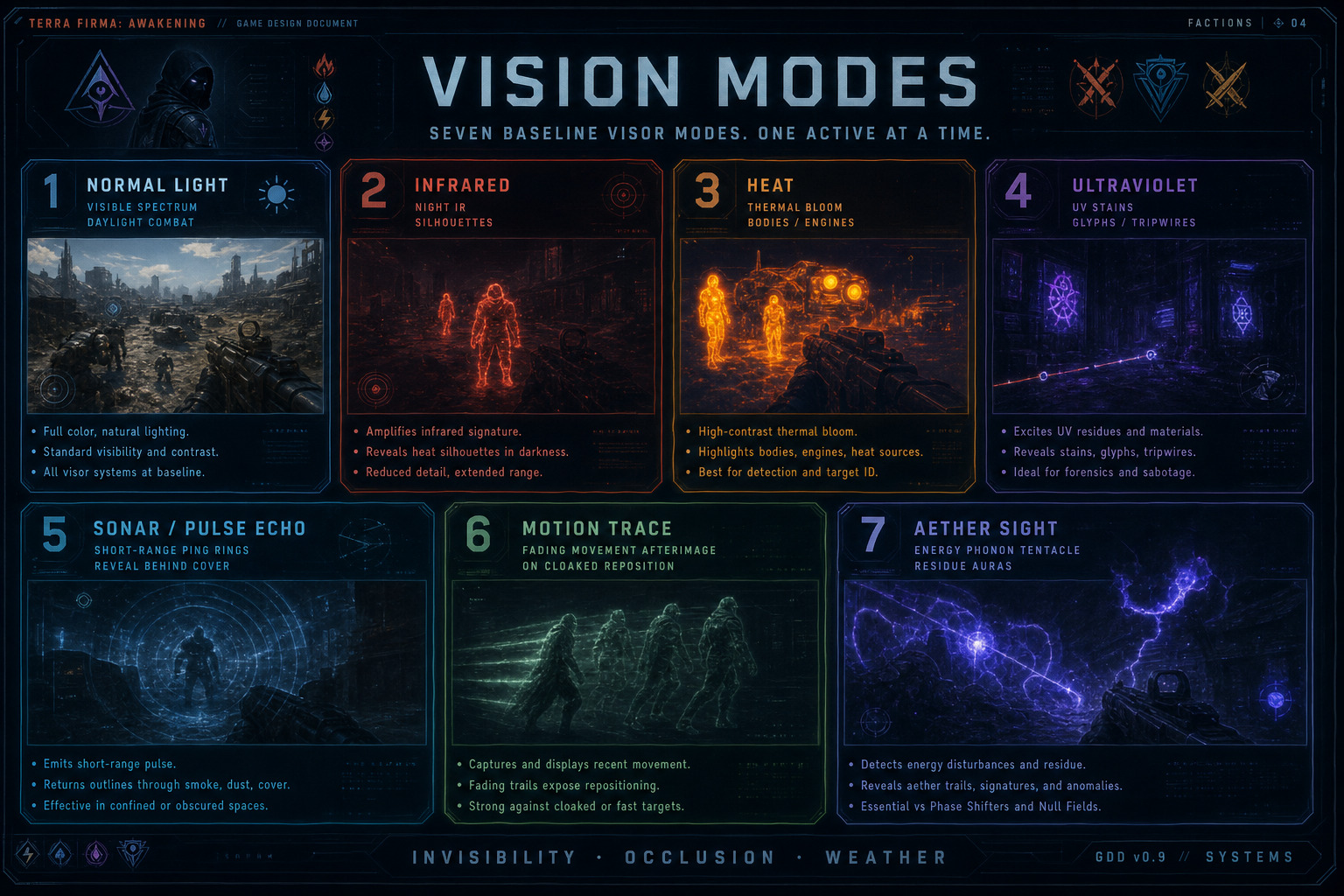
Section titled “Vision Modes”Every operative has seven optics modes on the apex-tech visor / HUD. Modes are baseline kit (not Phonon-gated). Cycle with the Vision Mode binding. Works in FPP and TPP. Beyond night and investigation, the modes are the primary counters to different invisibility types, occlusion, and bad-weather visibility loss.
1 — Normal Light
- Default visible-spectrum view. Standard lighting, Illumination radius, and color.
- Best for open, well-lit combat and reading UI / reticle clearly.
- Weak vs optical camo, fog/storm whiteout, and anything that dumps the visible band.
2 — Infrared
- Low-light / night optics. Boosts silhouette readability in dark corridors and outdoor night.
- Emphasizes reflected IR / active IR flood from the suit — not the same as Heat.
- Invisibility: punches through optical / light-bending camo and shadow-cloak that still reflects IR.
- Weather: restores silhouette readability in smoke, dust, light fog, and night rain when visible light is washed out.
3 — Heat
- Thermal vision. Hot bodies, engines, weapon discharge, and recent footprints bloom.
- Strong vs stealthed organics / warm machines; weak vs cold environments and heat-masked foes.
- Invisibility: counters thermal-damped stealth and bio-camo that hides in Normal/IR but still leaks heat — or reveals warm targets inside visual cloaks.
- Weather: cuts through heavy fog, blizzard whiteout, ash storms, and volumetric smoke when heat contrast remains.
4 — Ultraviolet
- UV reveal. Shows stains, nanite residue, glyphs, tripwires, and other UV-reactive marks invisible in Normal Light.
- Investigation / trap / puzzle and certain enemy-tag use cases.
- Invisibility: reveals nanite / phase / glyph cloaks and tagged predators that only register under UV (including some ‘cold’ stealth that beats Heat).
- Weather: less about storm pierce — more about reading UV marks when rain, blood mist, or chemical haze hides stains and tripwires in Normal Light.
5 — Sonar / Pulse Echo
- Short-range ping map. Emits a pulse that paints silhouettes and hard returns behind thin cover, soft walls, smoke, and light occlusion — not a full wallhack.
- Strong for close CQB reads when line of sight is blocked but the target is nearby.
- Invisibility / occlusion: reveals bodies and hard geometry returns that visual cloaks and smoke hide; weak vs far targets and pulse-damped soft stealth.
- Weather: punches readable returns through smoke, dust, and dense particulate where Normal/IR silhouettes smear.
6 — Motion Trace
- Movement afterimage overlay. Recent displacement leaves a fading trail on the visor.
- Best vs blink, short teleports, slide/dodge chains, and stealth reposition after a break.
- Invisibility: does not always show a cloaked body — it shows where motion just was, so still-camo targets that stop moving can go cold again.
- Weather: trails remain readable when fog/rain wash color contrast; less useful if nothing is moving.
7 — Aether Sight
- Apex-tech Energy / Phonon / tentacle residue view. Active auras, conduit glow, Phonon Chord signatures, and tentacle set power draw bloom on the HUD.
- Strong for reading caster / tentacle pressure and Energy-powered cloaks or fields.
- Invisibility: reveals Energy-backed camouflage, aether veils, and Phonon-fed soft stealth that optical/IR/Heat miss.
- Weather: less storm pierce — more about seeing aetheric activity through haze when physical contrast fails.
Only one vision mode active at a time. Affixes/skills may extend duration, reduce noise, or add overlays — they do not add an eighth baseline mode. Illumination (affix) still widens Normal Light readability; it is not a separate vision mode. Design rule: each major invisibility family, occlusion case, and weather whiteout should have at least one strong vision-mode answer (and one weak mode).
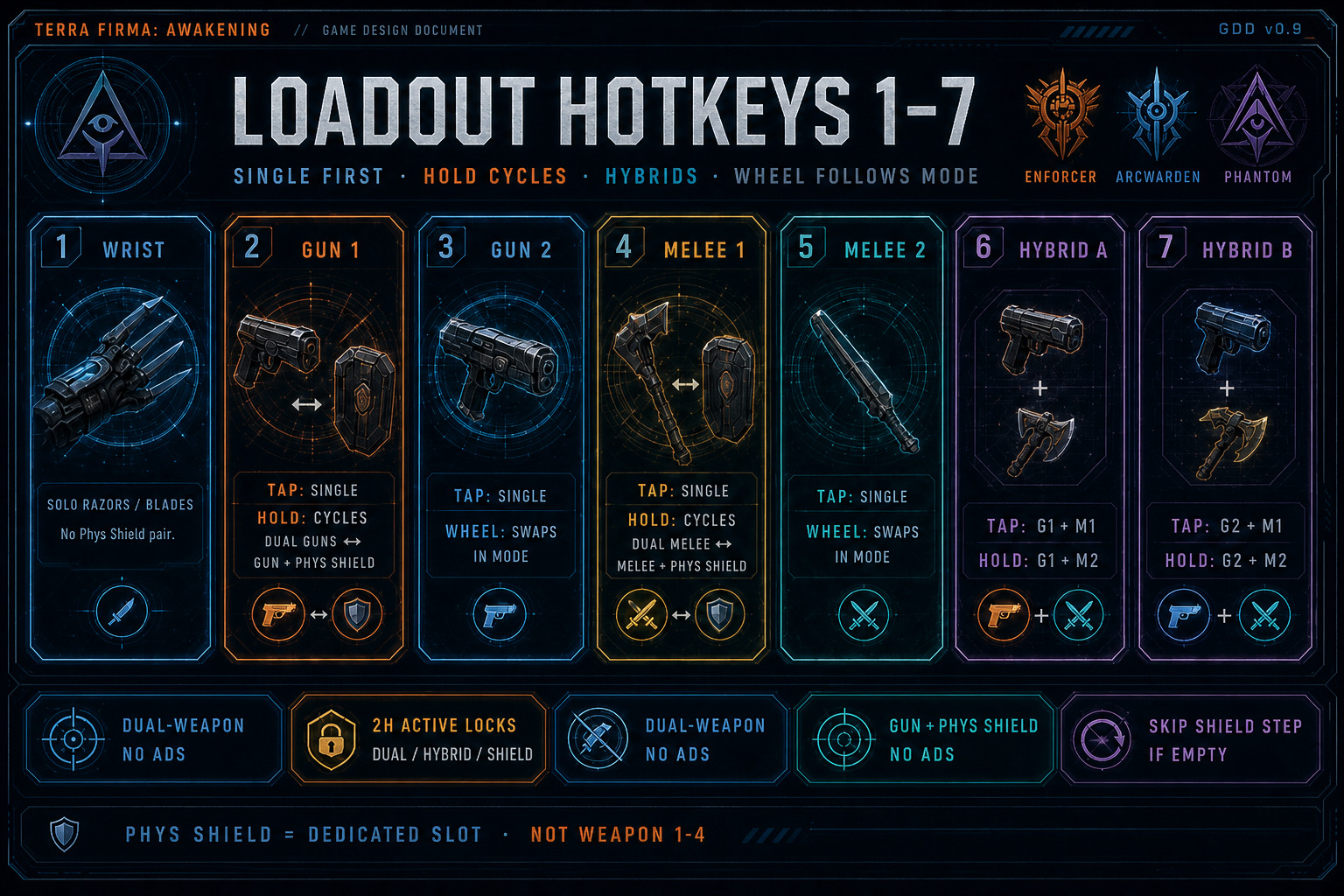
Figure — Hotkeys: 1 Wrist Melee · 2/3 guns (Hold 2 = dual guns ↔ gun+Phys Shield) · 4/5 melee (Hold 4 = dual melee ↔ melee+Phys Shield) · 6/7 gun+melee hybrids · wheel follows mode · 2H locks duals/shield.
Weapon Loadout — 4 Slots, Dual-Wield, Physical Shields & Hotkeys
Section titled “Weapon Loadout — 4 Slots, Dual-Wield, Physical Shields & Hotkeys”The paper doll carries four weapon slots plus Wrist Razors on their own hotkey. Weapon slots accept guns, melee, and Physical Shields. Every one-handed weapon can dual-wield with another valid 1H weapon. Physical Shields pair only with single-handed melee — never with guns. The paper-doll Energy Shield slot is separate sci-fi Barrier / Aegis gear — always on — and is not a physical board.
Four Weapon Slots + Wrist Razors
- Weapon 1 / Weapon 2 / Weapon 3 / Weapon 4 — any mix of guns, melee, and Physical Shields.
- No family is locked to a specific weapon slot number.
- Physical Shields are a weapon-slot item type (buckler / ballistic / riot / tower fantasy). They do not go in the Energy Shield paper-doll slot.
- Wrist Razors / Blades remain a dedicated paper-doll slot (not one of the four weapon slots) and have their own hotkey.
- Only slotted weapons / Physical Shields / Wrist Razors are available in combat; inventory pieces must be assigned first.
- All four weapon slots can feed matching active Sets under ASBP when those Unique / Apex items match (including a Physical Shield occupying a weapon slot). Legendary never.
Loadout Assignments
- First weapon / Second weapon — typically the shooting (gun) loadout picks used by keys 2 and 3.
- First melee / Second melee — the melee loadout picks used by keys 4 and 5.
- Assignments are player-configured — not hard-locked to any single Weapon 1–4 slot index.
- A Physical Shield may be assigned to a melee pick so hold-4 can form melee + Physical Shield.
Dual-Wield
- The player can dual-wield all single-handed weapons (guns and melee).
- Two-handed melee and Heavy Guns (2-Handed) cannot be dual-wielded.
- Gun dual-wield: hold key 2 when First weapon and Second weapon are both valid 1H firearms.
- Melee dual-wield: hold key 4 when First melee and Second melee are both valid 1H melee weapons.
- If either piece in a dual-wield pair is empty, 2H, Heavy Gun, Physical Shield (for gun dual), or otherwise not a valid 1H weapon for that dual type, that hold is a no-op (see Melee + Physical Shield for the shield case).
- While dual-wielding guns (or any gun in a dual-weapon stance): ADS is disabled.
- While dual-wielding: reload is much slower (tunable penalty).
- Dual-wield fire / swing verbs use both equipped 1H weapon pieces.
Melee + Physical Shield (1H Melee Only)
- HARD LOCK: Physical Shields can only be used with single-handed melee weapons.
- A Physical Shield in a weapon slot pairs with a valid 1H melee via hold key 4 when one melee assignment is valid 1H melee and the other is a Physical Shield.
- Valid pair: 1H melee + Physical Shield (either assignment order).
- Invalid: gun + Physical Shield; Physical Shield + Physical Shield; Physical Shield + 2H melee / Heavy Gun; Physical Shield alone.
- Gun + Physical Shield never activates — that stance no-ops.
- Hold 2 never forms a Physical Shield pair (gun dual only).
- Melee + Physical Shield: block / bash / guard verbs; Energy Shield from the Energy Shield slot remains active.
- While a Physical Shield is not in the active pair, it stays in its weapon slot but is not in-hand (no block/bash until paired again).
- Wrist Razors (hotkey 1) do not pair with a Physical Shield.
Physical Shield = combat off-hand board in a weapon slot, 1H-melee only. Energy Shield slot = always-on Barrier / Aegis module. Different systems.
Energy Shield Slot — Barrier / Aegis (Sci-Fi)
- Energy Shield is a dedicated paper-doll slot (Armor group). UI label: Energy Shield (Barrier) — not “Physical Shield.”
- Fiction: projector plate / barrier coil / field lattice — apex-tech Energy Shield gear.
- Accepts only Energy Shield / Barrier / Aegis gear — never Physical Shields.
- Equipped piece influences the character’s Energy Shield: capacity, recharge, % damage shift to Energy, and related ES packages (exact bands TBD).
- The Energy Shield slot stays equipped and its influence remains active while dual-wielding, using melee+Physical Shield, or using heavy / two-handed weapons.
Energy Shield combat pipeline still applies (see damage/resist volumes). ES bases use Barrier / Aegis / Screen fantasy naming in Rare/Augmented pools.
Keyboard Hotkeys — 1 through 5
- 1 — Wrist Razors / Blades.
- 2 — First weapon slot, solo (tap). If the first weapon assignment is a Physical Shield → no-op.
- Hold 2 — Dual-wield shooting: activates only if First weapon and Second weapon are both valid single-handed firearms. Otherwise no-op.
- 3 — Second weapon slot, solo. If the second weapon assignment is a Physical Shield → no-op.
- 4 — First melee weapon, solo (tap). If that assignment is a Physical Shield → no-op.
- Hold 4 — Dual-wield melee if First melee and Second melee are both valid 1H melee; OR melee + Physical Shield if one is valid 1H melee and the other is a Physical Shield; otherwise no-op.
- 5 — Second melee weapon, solo. If that assignment is a Physical Shield → no-op.
First/second weapon and first/second melee are loadout assignments — not hard-locked to any single slot index. Solo hotkeys never activate a Physical Shield alone (no raise-only stance). Hold threshold 200 ms. Pad provisional FS-INP-005. Mouse wheel = singles loop (includes Wrist); Dual / Phys Shield = Hold 2 / Hold 4.
Stance Summary
- Solo firearm (tap 2 or 3 on a gun) — ADS allowed; Energy Shield slot active; Physical Shield not in-hand.
- Wrist Razors (key 1) — razor/blade verbs; Energy Shield slot active; no Physical Shield pair.
- Solo melee (tap 4 or 5) — Energy Shield slot active; Physical Shield not in-hand.
- Dual-wield guns (hold 2 with two 1H firearms) — no ADS; slower reload; Energy Shield slot remains active.
- Dual-wield melee (hold 4 with two 1H melee) — Energy Shield slot remains active.
- Melee + Physical Shield (hold 4 when melee picks are 1H melee + shield) — melee+board stance; Energy Shield slot remains active.
- Gun + Physical Shield — never a valid stance (no-ops).
- Solo Heavy Gun / 2H melee — ADS follows that weapon’s rules; Energy Shield slot remains active; Physical Shield cannot pair.